When you purchase through the links on my site, you support the site at no extra cost to you. Here is how it works.
Metering plugins aren’t as exciting as a new synth or saturation effect. They don’t have a sound of their own, and you won’t fall in love with the tone they add to a track.
They’re there to tell you what’s happening technically when your ears aren’t enough to judge it accurately. Your mix might sound balanced in the studio, for example, while the final master behaves very differently once streaming normalization, mono playback, or different listening systems enter the picture.
That’s where a good loudness meter earns its place. I’ve used several of these tools in mixing and mastering situations, and the best ones don’t just throw a wall of numbers at you. They make it easier to understand loudness, true peak, dynamics, and stereo behavior and, more importantly, tell you what deserves your attention.
These are the seven I’d look at first.
1. Mastering The Mix LEVELS
I like how LEVELS avoids the intimidating presentation you get with some technical metering tools. It breaks the important information into separate sections for peak, loudness, loudness range, dynamic range, stereo field, and bass space, with the interface making problem areas immediately obvious.
The loudness section gives you integrated, short-term, and momentary LUFS readings, while the peak section can show conventional peak or true-peak information.
You can also choose reference presets for major streaming platforms and broadcast standards, so you’re not left comparing a random LUFS number against a target you found somewhere online.
The feature I find particularly interesting is Bass Space. Rather than simply telling you how loud the low end is, it is designed to help identify unwanted low-frequency energy between stem groups, which can be useful when you’re trying to keep kick and bass under control.
- Low-Pass Stereo Field View
Inside the Stereo Field section, the low-pass filter lets you isolate the lower frequencies and see where they are sitting in the stereo field.
- Loudness Range Meter
The Loudness Range (LRA) section measures the variation in loudness across the track rather than giving you another snapshot of the current moment.
That makes it useful for checking whether a verse, chorus, breakdown, or other section is substantially different in loudness from the rest of the arrangement.
I find it particularly helpful when a master feels either too flat or unnecessarily inconsistent, because the LRA reading gives me another way to judge the amount of contrast in the song.
- Correlation and L/R Balance Metering
The Stereo Field section also includes a phase correlation meter and Left/Right balance display alongside the stereo-width information.
I like having those checks together because a mix can look impressively wide while quietly developing a phase or channel-balance problem. Being able to inspect width, correlation, and balance at once makes troubleshooting much quicker.
- Genre and Platform Reference Targets
LEVELS includes reference presets covering streaming platforms and other delivery targets, while its dynamic-range section can also use genre-oriented reference information.
I wouldn’t treat any loudness target as a universal mastering rule, but these presets are useful as a reference point, especially when I want to compare my master against a sensible delivery target without manually configuring every threshold.
2. Waves WLM Plus
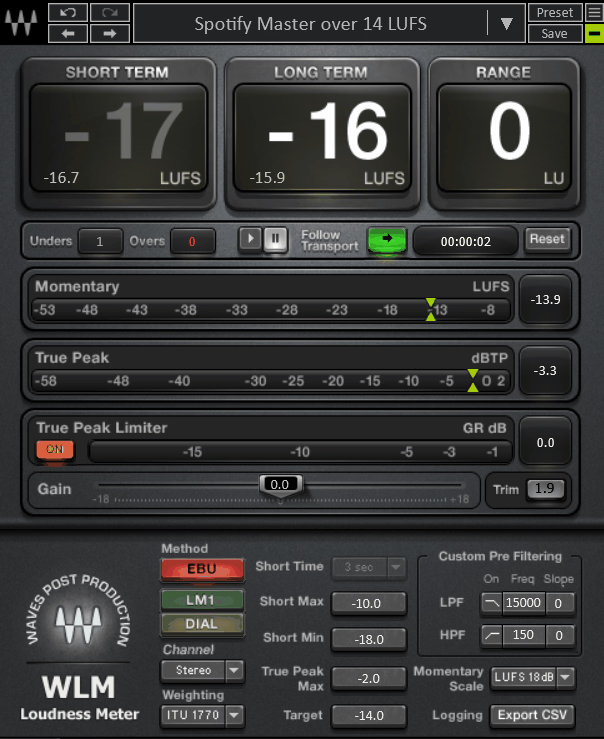
WLM Plus takes a more technical approach and makes considerably more sense to me when I’m dealing with broadcast, post-production, or other standards-driven delivery.
It is built around established loudness standards and provides momentary, short-term, and long-term loudness information, together with true-peak monitoring and configurable warnings.
The logging functionality is particularly useful for professional delivery. Rather than watching the meter manually and writing down results, you can track measurements and export them for documentation.
There’s also built-in gain and limiting functionality, which can be convenient when you need to make a final loudness adjustment without immediately opening another processor.
- Dedicated Mono and Stereo Versions
WLM Plus is available in mono and stereo versions, allowing you to insert the appropriate format for the channel you’re metering.
That sounds minor, but it matters in larger sessions where you’re checking several types of material. Using the correct format from the start keeps the metering setup easier to understand and avoids unnecessary confusion.
- Foreground and Dialog-Oriented Measurement
One of WLM Plus’s more specialized features is its ability to use foreground measurement, which can ignore material that falls significantly below the main content.
That makes more sense in dialogue-heavy broadcast and post-production work than in a typical music master, where quiet passages are often an intentional part of the arrangement.
- Adjustable Measurement Windows
WLM Plus gives you control over its measurement behavior rather than forcing every workflow into one fixed presentation.
- SoundGrid Integration
For studios and facilities already using Waves SoundGrid, WLM Plus can integrate into that networked environment rather than functioning only as a local plugin inside one DAW session.
This is a fairly specialized feature and not something I’d use as a reason to buy the plugin for ordinary music production. But if you’re already working in a SoundGrid-based live or broadcast system, it can make loudness monitoring considerably easier to integrate.
3. Goodhertz Loudness (FREE)
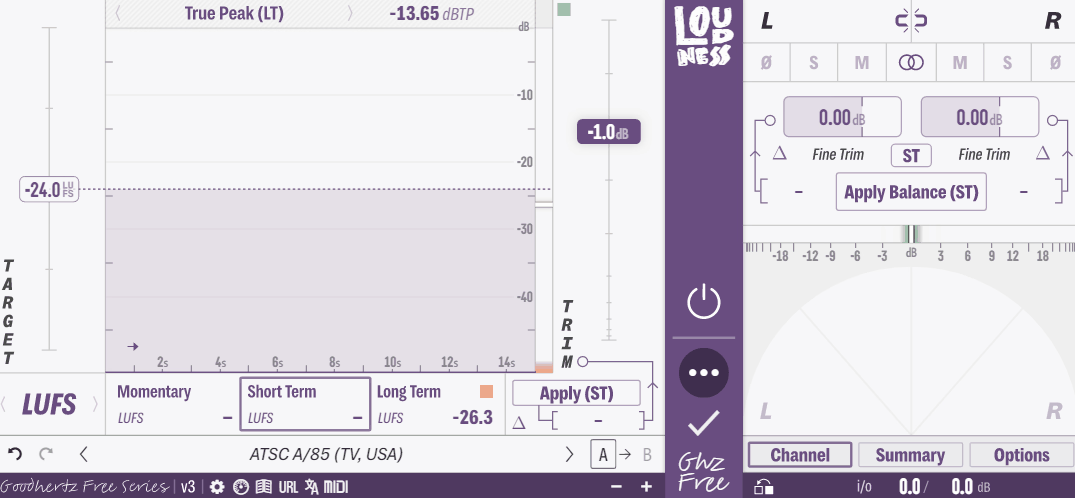
This one surprised me. Loudness is part of the Goodhertz Free Series, but it feels much closer to a professional metering utility than the usual free “basic meter” you download just because it costs nothing.
It provides LUFS, RMS, Peak, and True Peak information alongside stereo analysis, loudness history, and more detailed measurement pages.
The main workflow is simple: choose a target, monitor your material, and use the plugin’s controls to make appropriate gain or balance corrections.
What I like most is that the advanced pages don’t stop at loudness. You also get a goniometer, balance analysis, summary measurements, and detailed historical information that can help explain why a master is behaving the way it is.
For a free plugin, that’s a lot of useful information in one place.
- Apply Balance Auto-Correction
The Apply Balance function can use the measured left/right balance to calculate a correction and apply the required trim.
- Clickless Monitoring Controls
Goodhertz designed several of Loudness’s monitoring controls to switch without the clicks and pops that can occur when DAW automation changes certain monitoring states.
- Summary Page and Clipboard Export
The Summary page brings a lot of the important measurements together, including values such as crest factor, maximum momentary LUFS, maximum short-term LUFS, and loudness range.
You can also copy the results for use elsewhere, which makes it easy to keep a simple technical record of a master.
I find this useful when I need to send a quick loudness summary to a client or mastering engineer without taking screenshots of the entire plugin.
4. SSL Meter
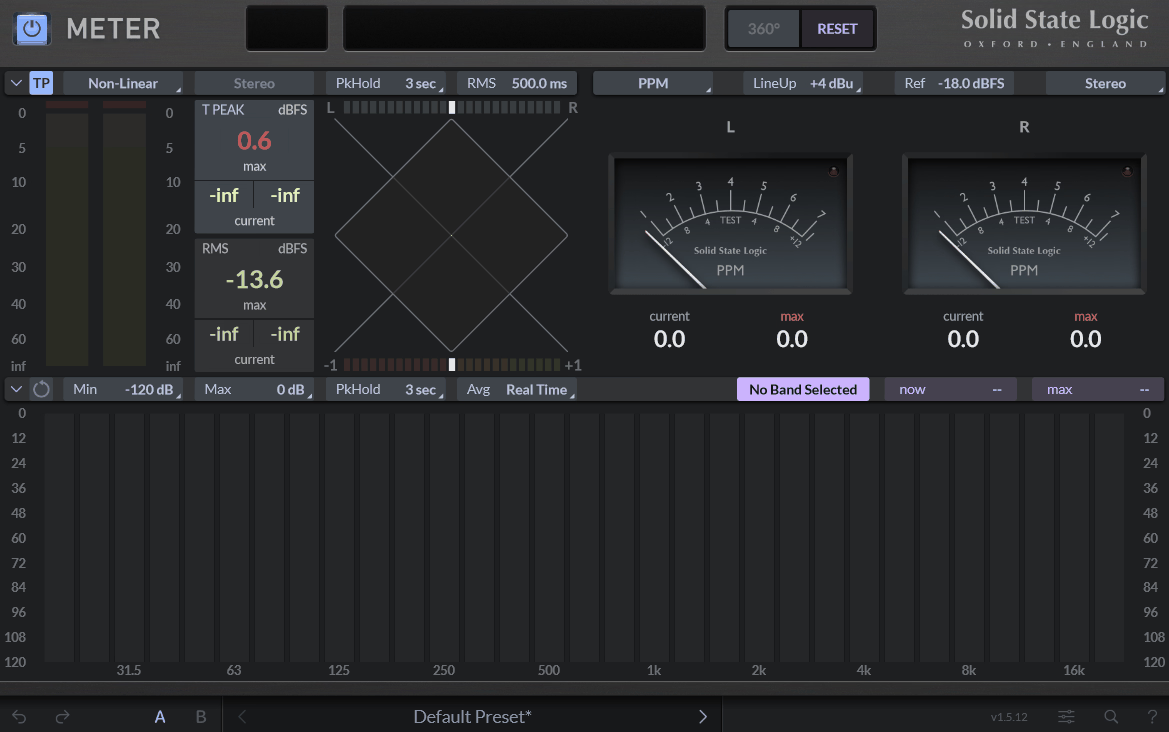
SSL Meter is a more conventional metering tool from Solid State Logic, and that’s exactly why I think it makes sense in this list.
It doesn’t try to be an all-in-one loudness compliance system like Meter Pro. Instead, it focuses on the core metering tools you might want during mixing, including Peak, True Peak, RMS, VU, PPM, phase, stereo balance, and spectral analysis.
For me, that makes SSL Meter a better fit for someone who wants a clean technical overview of a mix without buying an enormous mastering suite.
You can also integrate it with the SSL 360° ecosystem, which makes it particularly attractive if you’re already using SSL hardware.
- Cross-Platform Preset Management
The preset system uses an organized folder structure rather than forcing everything into one long list.
That makes it easier to maintain different setups for clients, sessions, or specific workflows, especially if you’re someone who actually saves your metering configurations instead of leaving everything at the default.
- Built-In Contextual Help
The built-in contextual help explains controls when you’re learning the interface.
I find this particularly useful with things such as K-System metering, where a producer who has mostly worked with conventional peak meters may not immediately understand what every reference line represents.
It’s not a replacement for learning the standards, but it makes the plugin easier to approach without constantly leaving the session to look things up.
- UF1 and SSL 360° Integration
SSL Meter can be used within the SSL 360° environment and with compatible SSL hardware such as the UF1, allowing metering information and controls to become part of a larger physical workflow.
That won’t matter much if you’re completely inside the DAW, but for an SSL-based studio, having the meter connected to the same ecosystem can make the setup feel considerably more coherent.
- Built-In Undo and Redo
It’s a nice safety net when you’re comparing different metering configurations.
5. T-RackS Metering by IK Multimedia
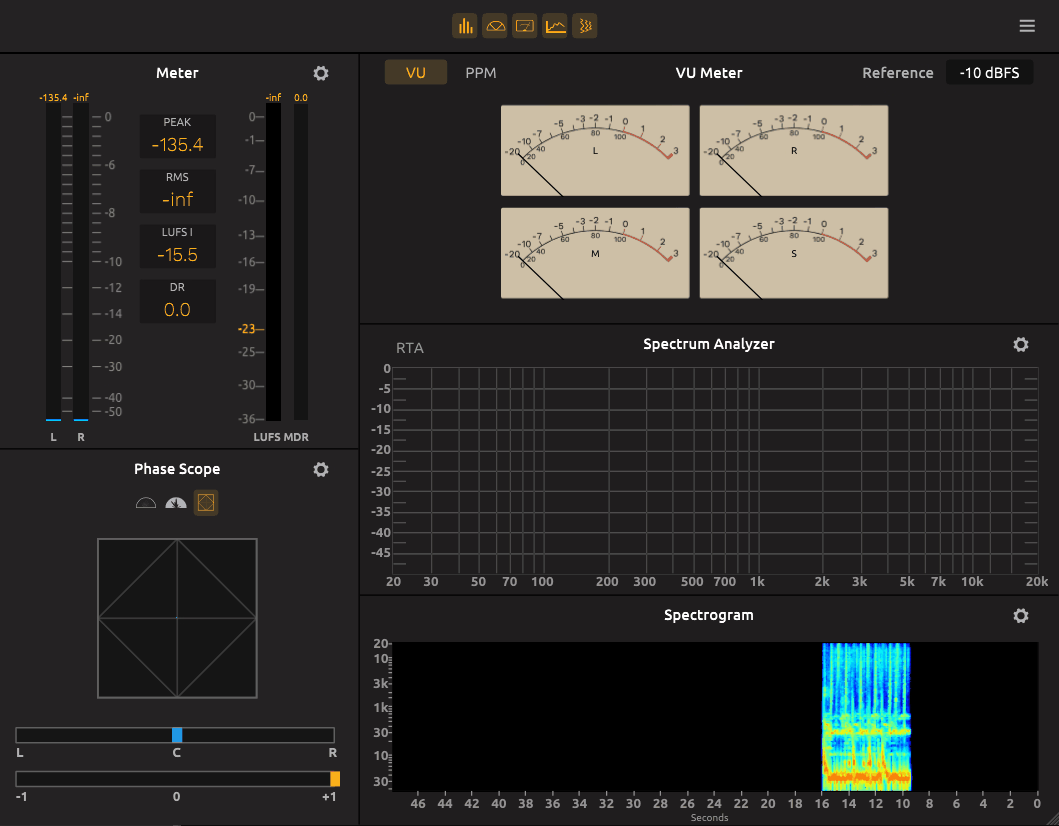
T-RackS 6 Metering takes the “put everything in one window” approach.
It combines LUFS, Peak, RMS, Dynamic Range, spectral analysis, phase, correlation, VU, PPM, and Mid/Side metering, so you can inspect most of the technical characteristics of a mix without opening a collection of separate plugins.
I see this more as a full technical inspection tool than a meter I’d necessarily leave open on every channel.
The floating-window workflow is also useful if you have a second monitor and want to keep your technical analysis visible while working elsewhere in the DAW.
- Genre-Based Loudness References
The loudness and dynamics sections provide reference information that can be selected according to genre, alongside more formal standards and delivery targets.
I like this because it acknowledges something that a single LUFS number doesn’t: different types of music can tolerate and benefit from different dynamic behavior.
I still treat genre references as a guide rather than a rule, but they’re useful when I want a starting point before comparing the master against actual reference tracks.
- Multi-Mode Real-Time Analyzer
The built-in RTA can be configured to emphasize different types of spectral information, including peak and averaged behavior.
- Adjustable VU and PPM References
The VU and PPM meters can be calibrated to reference levels that fit the workflow I’m working in.
That’s particularly useful when moving between modern digital metering and workflows influenced by analog calibration standards.
6. Youlean Loudness Meter 2 (Free Edition)
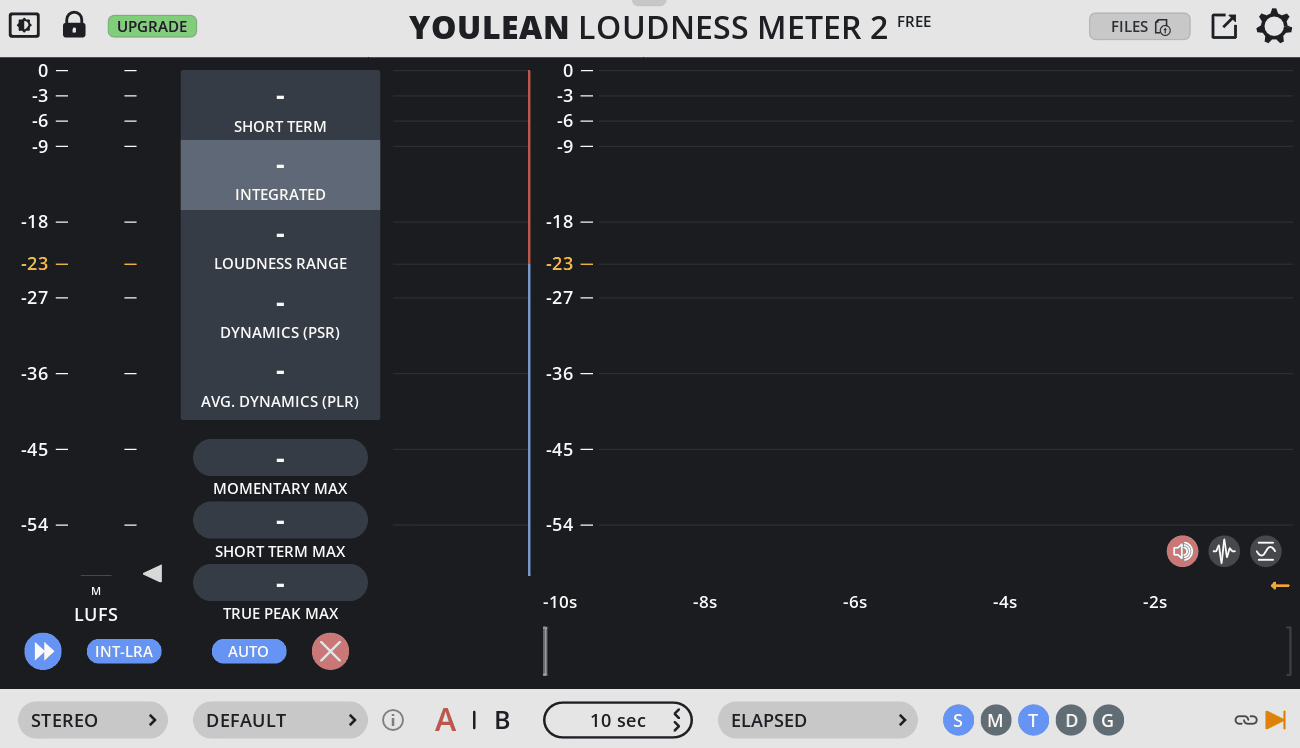
If I wanted one free loudness meter that I could recommend to almost anyone, Loudness Meter 2 would be near the top of the list.
The free edition gives you integrated loudness, loudness range, true peak, short-term and momentary readings, plus a history graph that shows how the measurement develops over the course of the track.
That history is one of the reasons I like it. Instead of looking at a single final LUFS number, you can see how the loudness behaves throughout the arrangement.
It also includes references for major loudness standards and streaming workflows, while more advanced features such as batch analysis and report export are reserved for the Pro version.
- Multichannel Support
The free edition supports mono, stereo, 5.1, and 7.1 configurations, which is unusually generous for a free loudness meter.
- Multiple Loudness Standards
Youlean includes reference options for standards such as ITU-R BS.1770, EBU R128, ATSC A/85, and other regional delivery specifications, alongside streaming-oriented targets.
That makes it useful for more than music mastering. If I need to check a piece of content against a particular delivery standard, I can switch the reference rather than treating everything as though Spotify and broadcast television use the same rules.
- Multiple Readout Types
The plugin gives you much more than one LUFS number. Depending on the view, you can inspect integrated loudness, short-term and momentary loudness, true peak, loudness range, and other dynamic information.
- Runs in a Wide Range of DAWs
Loudness Meter 2 is available in common plugin formats including VST, VST3, AU, and AAX, as well as a standalone application.
7. sonible true:level
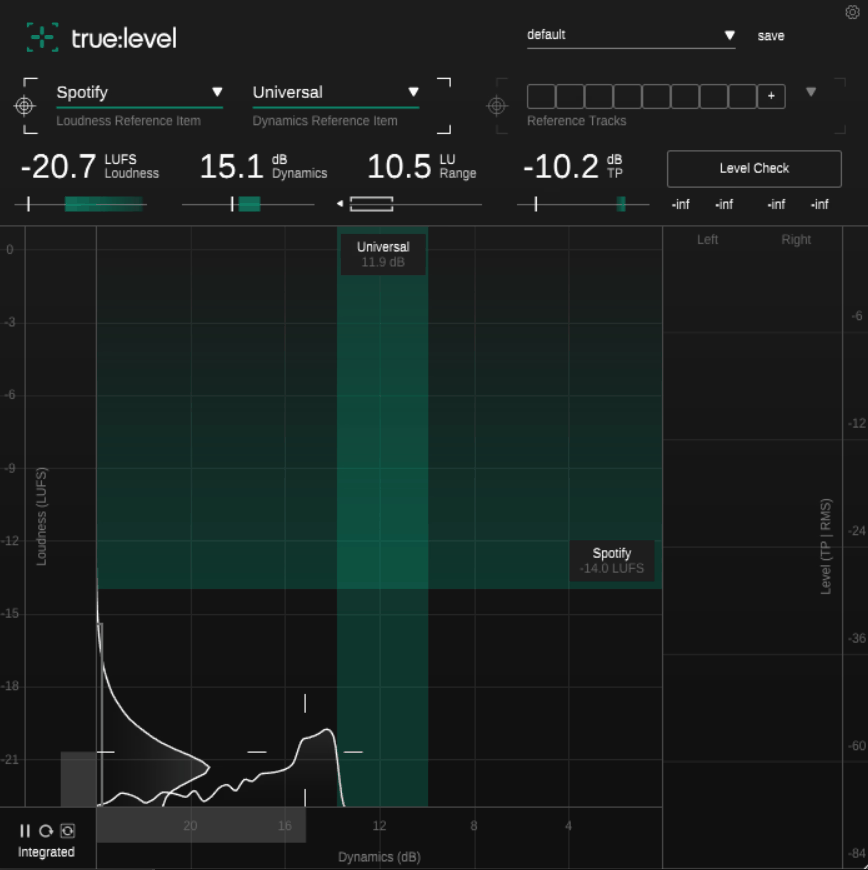
This is the one I’d choose when loudness isn’t the only thing I care about.
true:level is built around the relationship between loudness and dynamics, rather than presenting those measurements as completely separate problems.
The central display puts the two measurements on an X/Y grid, making it immediately obvious whether a track is sitting inside your chosen reference area or drifting toward something louder, quieter, more compressed, or more dynamic than intended.
- Loudness and Dynamics Grid
The central Loudness and Dynamics Grid places loudness and dynamics together so you can see their relationship rather than judging them independently.
The vertical axis represents LUFS loudness, while the horizontal axis represents dynamics. Your track appears as a crosshair, with reference areas showing where the selected target sits.
- Up to Eight Reference Tracks
You can load up to eight reference tracks, with true:level analyzing their loudness and dynamics and using the combined information to establish a reference zone.
This is probably my favorite feature in the plugin because it changes the comparison from “Am I hitting the recommended LUFS?” to “Does my master behave like the records I’m actually trying to compete with?”
That is a much more useful question when making final mastering decisions.
- Loudness and Dynamics Histograms
true:level also keeps a history of the values measured during playback rather than only showing the current position.
That gives me a better idea of how consistently the track behaves. If one section is dramatically different from the rest, the history makes that easier to spot than a meter that only shows the value at the current moment.
- Genre-Specific Dynamics References
The plugin includes genre-based dynamics references in addition to delivery and loudness references.
I like this because it separates two questions that are often confused: How loud should this be? and How much dynamic movement makes sense for this style of music?
Those aren’t the same thing, and true:level’s reference system makes that distinction much clearer.

Hey, I’m Viliam, I started Music Circuit to write about plugins and gear, so you always know what’s new and what’s worth trying. You’ll also find guides and tips here to help you get started, whether you’re picking your first plugin or building out a full studio.