When you purchase through the links on my site, you support the site at no extra cost to you. Here is how it works.
Creative blocks in music production usually come down to one thing: doing the same move too many times in a row. The best randomizer plugins exist specifically to interrupt that pattern, whether that means scrambling a MIDI phrase, reshuffling a drum kit, or generating an entirely new texture with one click.
I spent some time time going through a wide range of these tools to see which ones actually spark something usable instead of just making noise for the sake of noise.
That said, I’m covering Futurephonic Rhythmizer Fusion, Audio Tech Hub MIDI MORPH, Beatsurfing RANDOM, United Plugins Randomachine, XLN Audio XO, Sugar Bytes Graindad, and few other ones, plus two free tools worth grabbing at the end!
These plugins span MIDI generation, granular processing, drum sample randomization, and full multi-effect mangling, so you’ll find something here whether you need new melodic ideas or you just want to destroy a loop in interesting ways.
I’ll walk through what each one actually does so you can figure out which fits the gap in your own workflow. Let’s get started!
1. Beatsurfing RANDOM
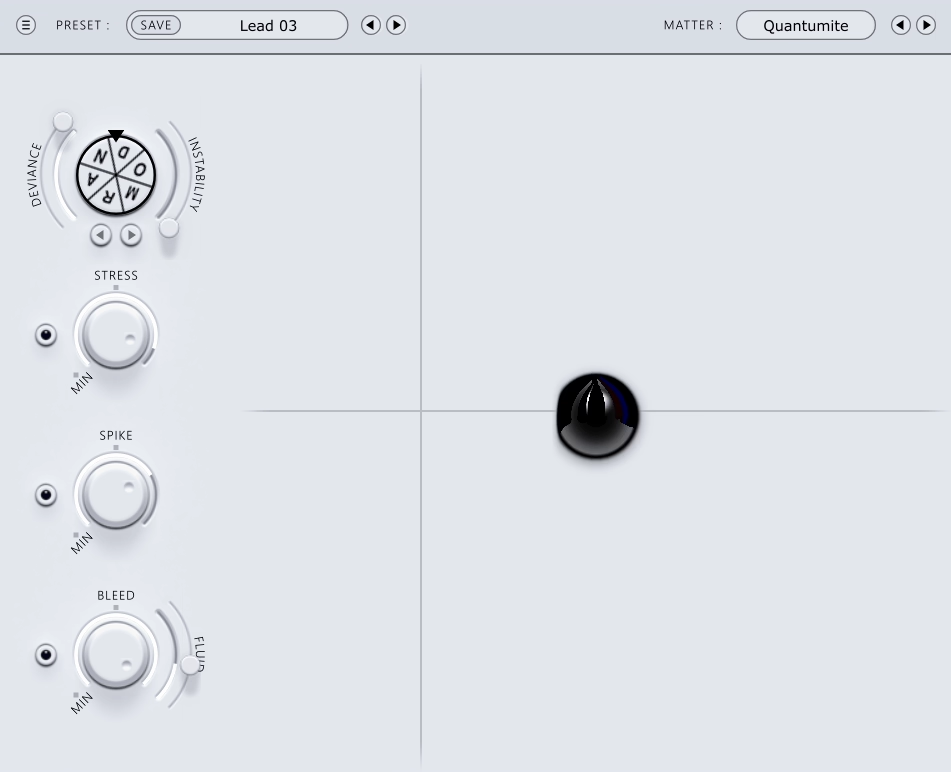
A lot of synths get designed by an engineer alone, tuning parameters until the math sounds right. This one started differently, born out of repeated sessions between a plugin development team and a multi-platinum producer sketching sound direction on a whiteboard.
The goal from the start was inharmonic, aliased, resonating tones, hard percussive hits, and flanging textures, not clean, conventional synthesis. What came out of that collaboration between BEATSURFING and producer Phazz is RANDOM, a synth built entirely around neural network principles to generate sounds that never repeat.
- RANDOM Wheel with DEVIANCE
Spinning the wheel randomizes across hundreds of parameters at once, and the DEVIANCE control sets how extreme each spin gets. I like keeping it low at first just to hear the baseline character before pushing it further.
- Synth and Resonator Engines
You get two distinct sound sources built into the plugin. The Resonator runs on 8 modulated delay lines and two feedback loops, with its own noise sources, phase modulation, filters, and 6 envelopes.
- INSTABILITY Control
I find the INSTABILITY parameter genuinely useful for adding note-to-note variance, since it shifts the sound slightly with every key you press instead of locking one randomized state across the whole performance.
- Feedback Loop Distortion
Distortion sitting inside the resonator’s feedback loop unlocks everything from out-of-tune metallic flange harmonics for snares to in-tune Karplus-Strong synthesis for 808-style low end. You can land on either extreme depending on where you set things.
- Pure Synthesis, No Samples
This is not a sampler in any sense, and I think that’s genuinely worth knowing going in. Every sound you hear is generated live through the synthesis engine, which is exactly why no two spins of the wheel ever sound identical.
- XY Pad Expression
An expressive XY pad gives you control over hundreds of parameters unique to whichever engine is active. I’d recommend spending time here manually once you’ve found a spin you like, since it’s where you can actually shape the result instead of just accepting it.
2. United Plugins Randomachine
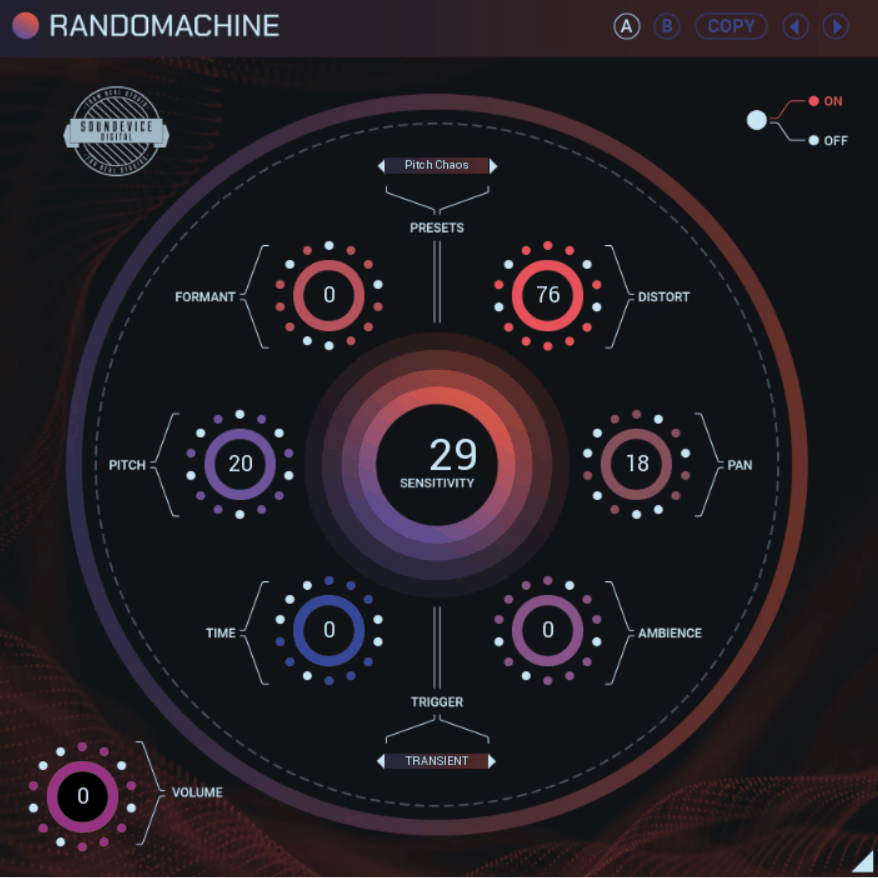
Six effects, three trigger sources, and one goal: making repeated samples stop sounding repeated. Randomachine’s six built-in processors, pitch and formant shifting, ambience, saturation, panorama, and time offset, all shift together every time the plugin fires, so no two hits of the same sample come out identical.
- Transient, Sync, and MIDI Triggering
You choose how randomization gets triggered: by incoming transients, by tempo sync at a set note division, or by MIDI notes from any track or controller. I like that you can switch between all three depending on the material.
- Sensitivity Control for Transient Mode
A dedicated sensitivity knob tunes how responsive the transient detection is, which matters a lot if you’re processing quiet or inconsistent source material. I found this needed real tweaking on anything that wasn’t a clean, punchy hit.
- 64-Bit Processing at Any Sample Rate
Internal processing runs at full 64-bit quality regardless of your session’s sample rate, up to 192 kHz and beyond.
It’s not a flashy feature, but I appreciate that it’s genuinely there without you having to think about it.
- Smart Bypass and Sleep on Silence
Smart Bypass avoids clicks or pops when you automate the plugin on or off, and Sleep on Silence reduces CPU load automatically when there’s no signal coming through. Both run quietly in the background while you work.
3. Futurephonic Rhythmizer Fusion
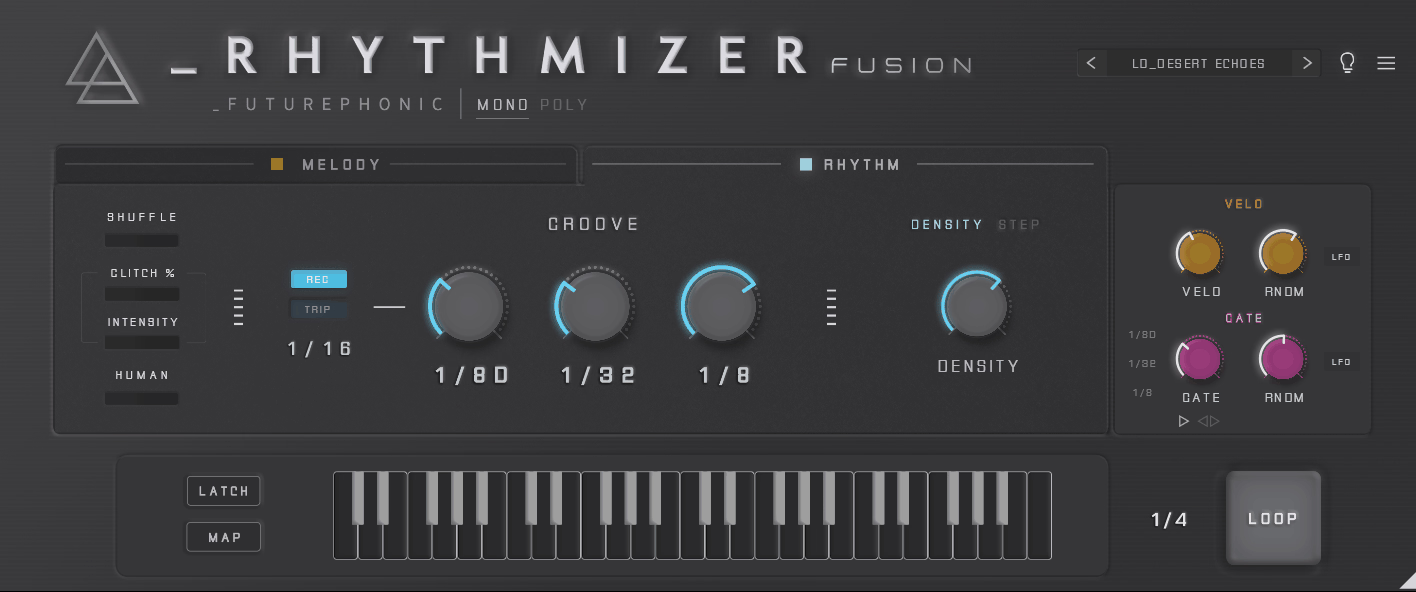
Built as the direct evolution of Futurephonic’s original Rhythmizer, Rhythmizer Fusion takes the classic MIDI randomizer concept and folds a full poly arpeggiator into it, something the earlier version never had.
I think what separates it from a basic arpeggiator is that it randomizes velocity, gate length, octave, humanization, and even pitch bend data alongside the notes themselves, so you get movement in the performance, not just the pitches.
- Poly Arpeggiator Engine
I like that it works with both monophonic and polyphonic MIDI input, so you can feed it a single note or a full chord and get an arpeggiated, randomized result either way. This is the feature that separates Fusion from the original Rhythmizer.
- Step Sequencer With Random Step Slider
The built-in step sequencer includes a dedicated Random Step slider that injects controlled chaos into an otherwise programmed pattern. I think this is the fastest way to keep a sequence groovy without it turning into total noise.
- CC Mapping and Modulation
You get direct CC mapping for routing randomized modulation data to other parameters in your synth or effects chain, which I find genuinely useful for adding motion beyond just notes and velocity.
- Drag to MIDI Export
Once you land on something you like, you can drag the result straight out as a MIDI file into your DAW. I think this is a small thing that saves real time compared to manually recording a MIDI pass.
- Glitch Engine
A dedicated glitch engine adds unpredictable stutters and repeats on top of the generated pattern, ranging from subtle touches to fairly aggressive chaos. I’d recommend starting with it turned down low, since it escalates fast.
4. Audio Tech Hub MIDI MORPH
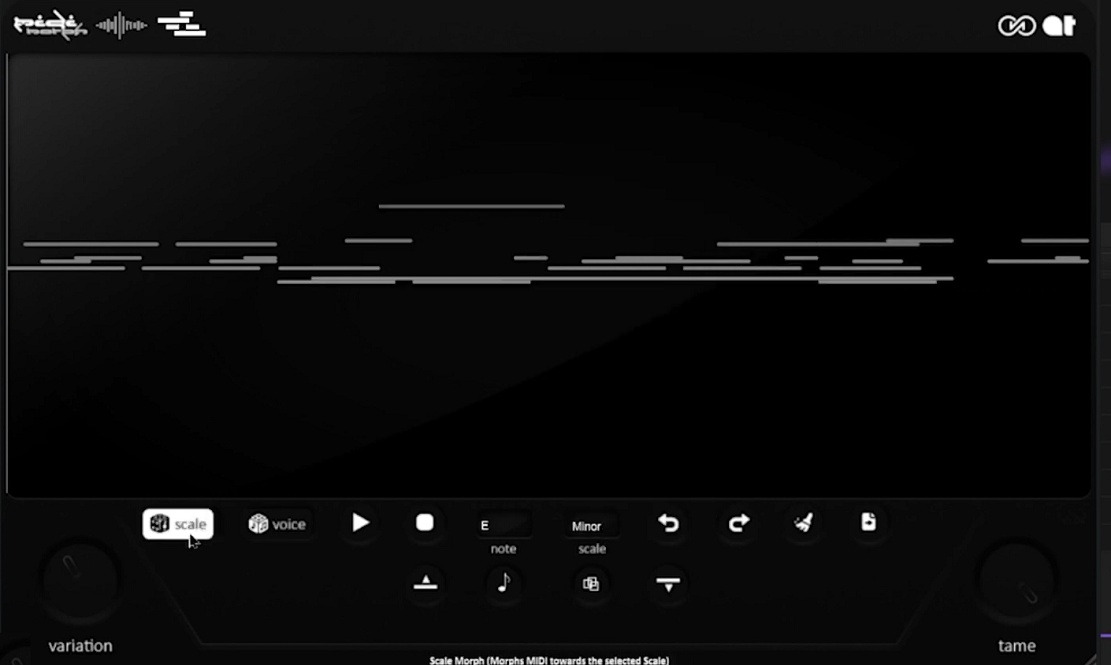
A lot of MIDI generators only work in one direction, taking existing notes and shuffling them into something new. This one goes a step further by also converting raw audio into editable MIDI, a feature that’s uncommon among randomizer-style plugins in this space.
Because that audio-to-MIDI conversion sits right alongside the randomization tools, MIDI MORPH lets you drop in a vocal or instrument recording and get a full, editable, generated musical part back out.
- Voice Morph and Scale Morph
I like having two distinct randomization modes to reach for. Voice Morph focuses on transposition and note swapping within your selected scale, while Scale Morph allows a wider range of randomization effects while still respecting your chosen key.
- Hi-Hat Pattern Generator
You can build rolling, humanized hi-hat patterns in seconds, with density and swing dialed directly to your project’s tempo.
I think this alone justifies keeping the plugin loaded even on tracks where you’re not using the melodic side.
- Six Creative Arpeggiator Modes
Beyond the standard Up, Down, and Up-Down directions, you get six additional modes: Pedal, Octave, Converge, Ratchet, Euclid, and Evolve.
I’d recommend running through all six on the same chord, since they shape the result in genuinely different ways.
- Virtual MIDI Port Routing
You can send generated MIDI to any instrument, the plugin’s built-in virtual MIDI port, or drag it straight back into your DAW timeline. I find this flexibility makes it easy to slot into almost any workflow without extra routing headaches.
5. XLN Audio XO
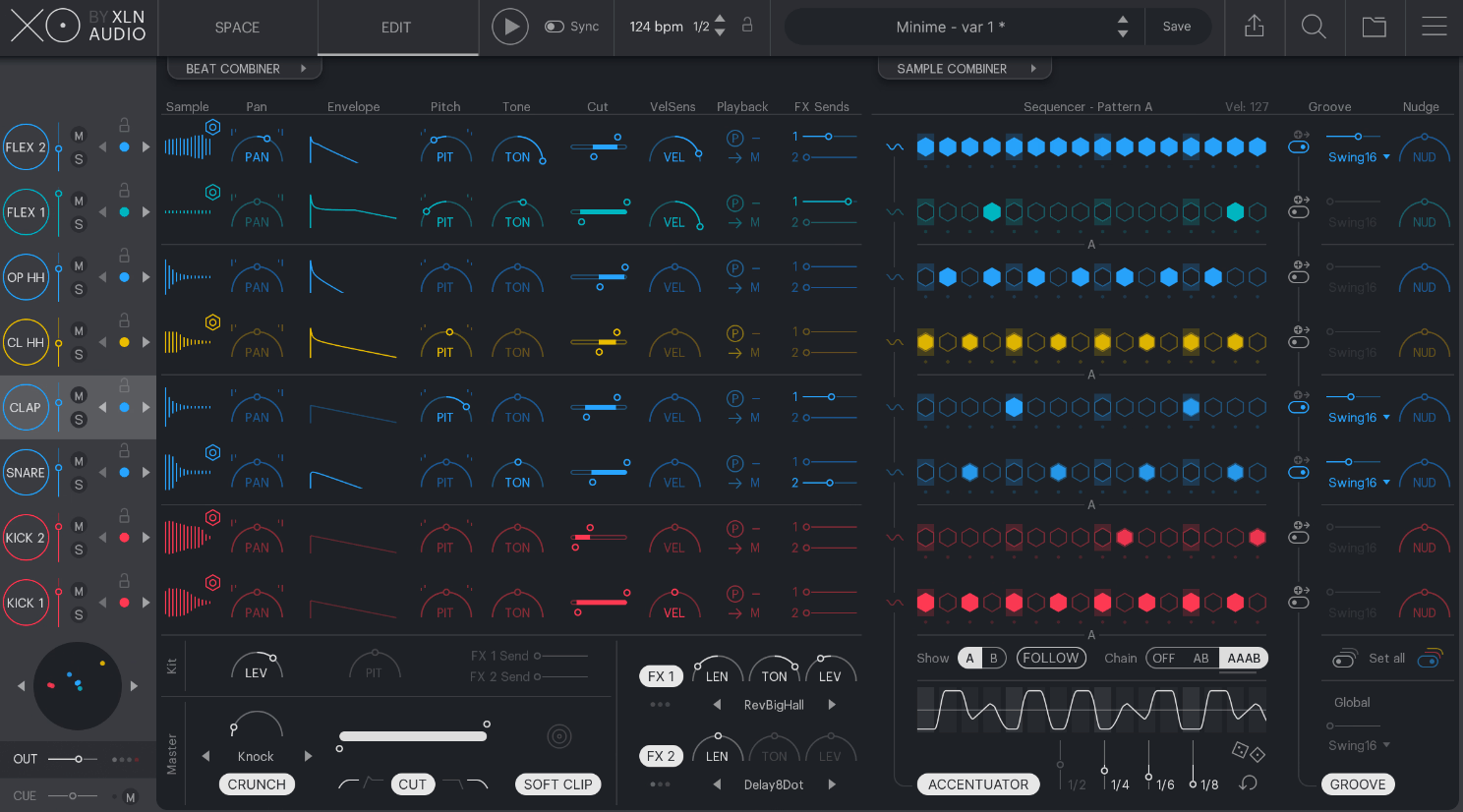
Most drum sample libraries force you to scroll through folder after folder of similarly-named one-shots, hoping you recognize a good kick by its filename. You get an entirely different approach from XLN Audio XO, which sorts every one-shot you own by sonic similarity in a visual space instead of alphabetically by folder.
- Over 8,000 Factory Sounds
The library ships with more than 8,000 one-shot samples sorted automatically by similarity, and you can add your own folders alongside them for XO to organize the same way.
- Similarity-Based Sample Browsing
I like that clicking any sound shows you a Similarity List of the closest-sounding alternatives in your library. It turns finding the right snare into browsing instead of searching, and it genuinely speeds things up.
- 8-Lane Step Sequencer
You get eight sequencer lanes covering kick, snare, clap, hats, and flex slots, each independently editable. This is where you build the actual pattern before layering in randomization.
- Accentuator and Groove Templates
The Accentuator adds dynamics and life to a flat, mechanical-sounding pattern, and curated Groove Templates dial in swing and feel without you programming velocity by hand. I find combining both gets a pattern feeling human fast.
- Filtered Randomization
You can filter randomization by type, kick, snare, percussion, effects, or by attributes like frequency, length, and how acoustic or synthetic a sample sounds. I think this targeted approach beats a blind randomize button by a wide margin.
- Multi-Format Export
Export your finished beat as separated WAV stems by dragging straight out of the plugin, and the sample library itself now supports FLAC, MP3, OGG, and WMA alongside WAV and AIFF.
6. Sugar Bytes Graindad
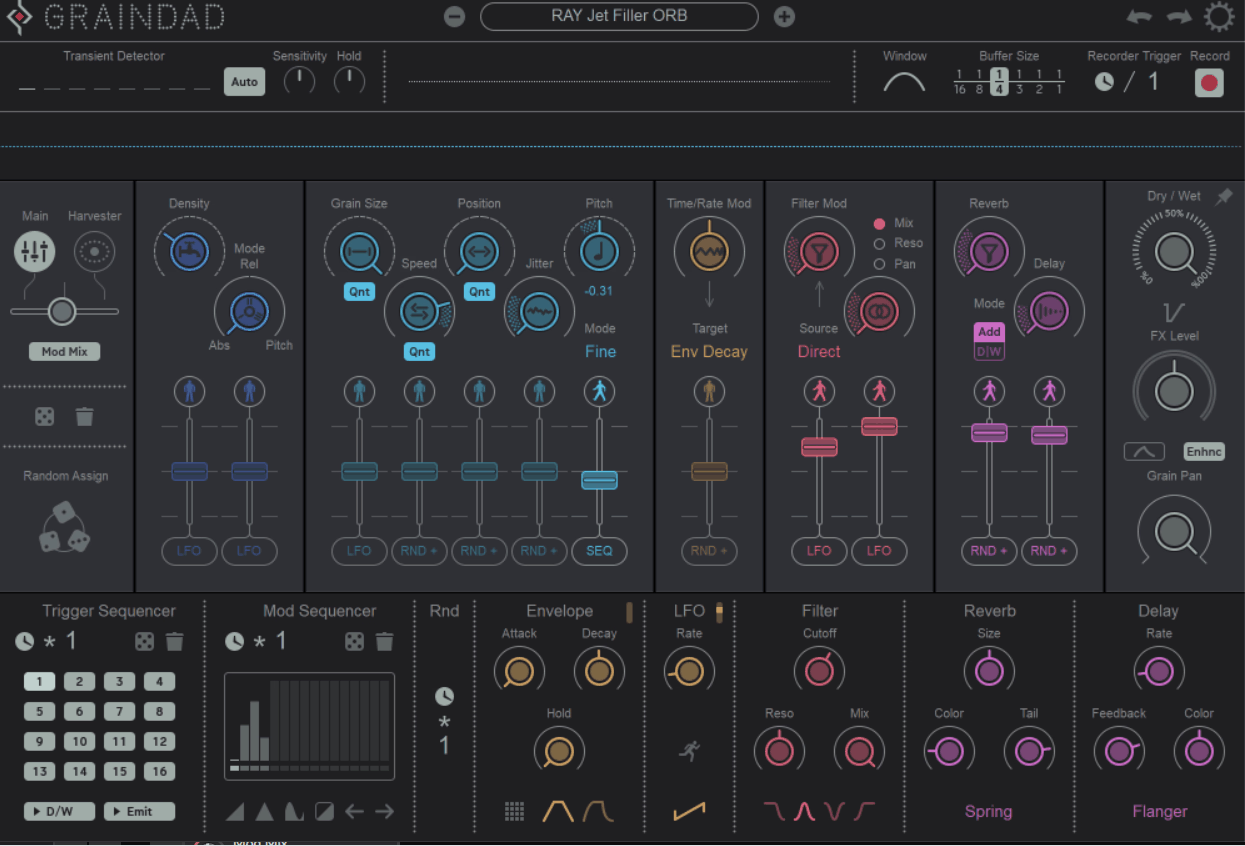
Granular synthesis works by slicing audio into tiny fragments, called grains, and reassembling them into new textures. That process alone can produce washy pads and atmospheric smears, which is where a lot of granular tools stop. The engine behind that deeper exploration, the Grain Engine at the center of Sugar Bytes Graindad, can play back up to 64 simultaneous grains while recording and playing from the same buffer at once.
- 12 Main Parameters
Despite the depth underneath, the front panel exposes just 12 main controls, giving you fast access to freezing, stuttering, glitching, and texturizing without diving into submenus first.
- Intelligent Randomizers
You can apply varying amounts of randomization to nearly every parameter in the plugin, and I like that you can define exactly what triggers it, whether that’s a transient in your audio or a synced clock division.
- 16-Step Trigger Sequencer
A built-in 16-step sequencer lets you program exactly when grains fire, giving you rhythmic control alongside the chaos. I find this the fastest way to lock granular chaos to a beat instead of letting it drift freely.
- Filter Section
Low-pass, high-pass, band-pass, and band-reject filters sit in the signal path, and I’d recommend the band-pass filter specifically if you want to carve out a narrow, almost EQ-like emphasis inside the granular texture.
- Modmix Crossfading
The Modmix control blends between the Harvester and the classic modulation system in real time. You get surprising, evolving results from this blend that neither system produces on its own.
7. 510k POLYLLOP
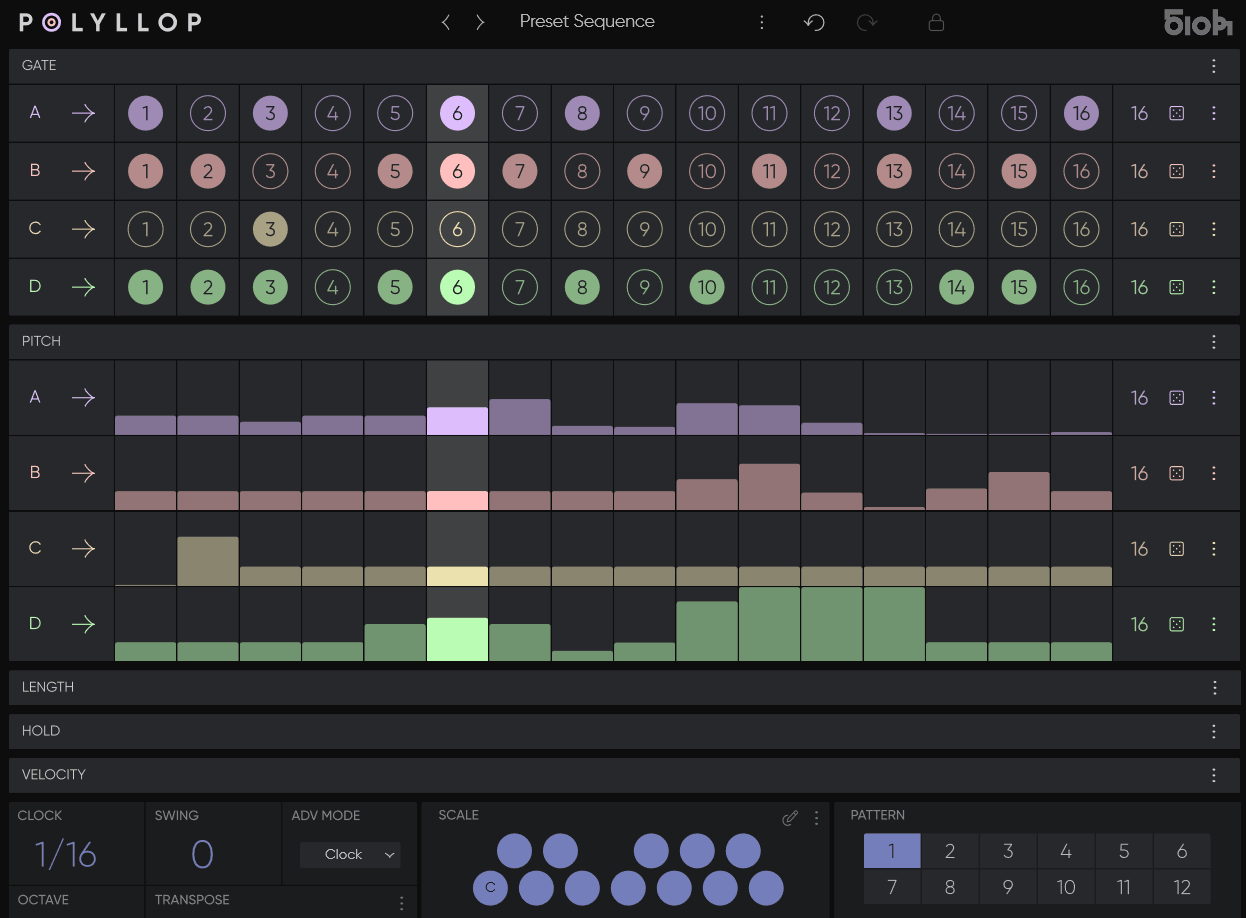
POLYLLOP sequences up to four independent voices at once, each with its own rhythm, melody, duration, hold, and velocity lane running at its own length. It builds directly on 510k’s flagship sequencer SEQUND, but pushes the underlying logic into genuinely polyphonic and polymetric territory that a single-lane step sequencer simply can’t reach.
- Four Independent Polymetric Lanes
Each of the four voices runs its own lane length for gate, pitch, length, hold, and velocity, so you can set completely different step counts per lane and let the patterns drift in and out of phase with each other.
- Scale and Key Locking
You select a key and scale in the Scale Panel, and every pitch value generated automatically conforms to that harmonic choice. I like that this keeps even wildly polymetric patterns musically usable instead of dissonant.
- MIDI Transpose Arpeggiator Mode
With MIDI transpose enabled, you can hold chords on your controller and shift the entire generated pattern live, turning it into a sophisticated arpeggiator and chord maker on top of its sequencing role.
- Multiple Advance Modes
You can switch between Clock, Gate, or MIDI advance modes, which fundamentally changes how the sequence progresses through its steps.
I’d recommend trying MIDI advance mode specifically if you want performance-driven control instead of a fixed clock.
8. Sugar Bytes Turnado
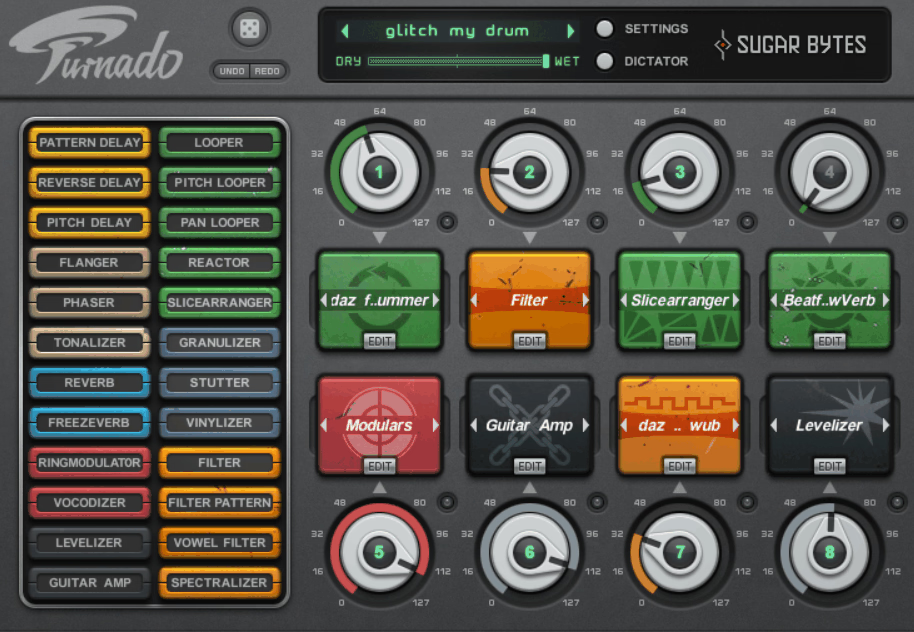
Turnado: one knob per effect, turn it up and the effect engages, turn it further and the parameters start moving, turn it back down and it’s gone.
That’s the entire interaction model behind 24 different effects spread across eight assignable slots, and I think it’s one of the simplest, fastest ways to add live, expressive processing that exists in any plugin I’ve used.
In addition to that, you get a global randomize button for the whole rack plus individual randomize buttons per slot, which I find far more useful in practice since you can lock in the effects you like and only randomize what’s left.
- Dual LFO and Envelope Follower Per Slot
Each effect slot includes two LFOs or step sequencers plus an envelope follower for hands-off modulation. I like assigning the envelope follower specifically when I want the effect to react to the incoming signal’s dynamics.
- Dynamic Signal Flow Routing
You can route effects in a fixed series from slot one through eight, or switch to Dynamic Signal Flow, where the order follows whichever effects you’ve actually activated. This changes the character of stacked effects significantly.
- 20 Remap Curves
Each parameter mapped to the main knob can use one of 20 remap curves, letting you control exactly how a single knob turn translates into that parameter’s movement. I think this is the detail that keeps Turnado from feeling like a toy once you dig in.
9. Sinevibes Rerun v2
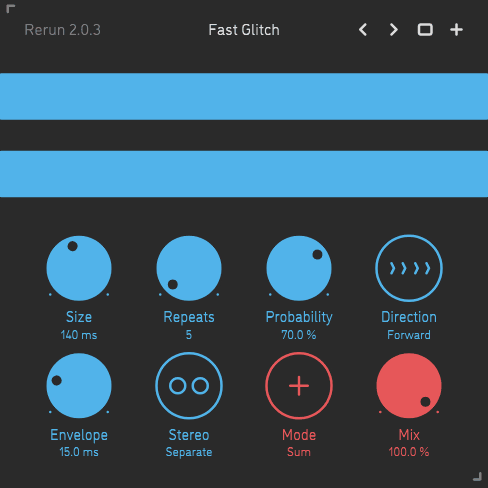
A repeater effect samples a slice of incoming audio and plays it back on loop, which is a familiar idea by now. Built specifically to randomize itself instead of requiring manual control, Rerun v2 constantly resets both the slice size and the number of repeats every time it restarts its sampling cycle.
- Randomized Slice Size and Repeat Count
Every time the sampling cycle restarts, both the slice size and the number of repeats get randomized independently, so consecutive cycles rarely sound alike even on static source material.
- Three Playback Modes
You can set playback to forward, reverse, or alternating, and I like switching to alternating specifically when I want a slightly disorienting, tumbling character instead of a straightforward chopped repeat.
- Probability-Based Engagement
The probability parameter determines whether Rerun engages or simply passes audio through on any given cycle, running in either summed or gate mode. I find this the single most important control for dialing intensity up or down.
- Independent Stereo Channel Processing
Left and right channels are processed completely independently of each other, which you can hear clearly as the stereo image shifts and drifts on its own during longer passages.
10. Audiomodern Loopmix
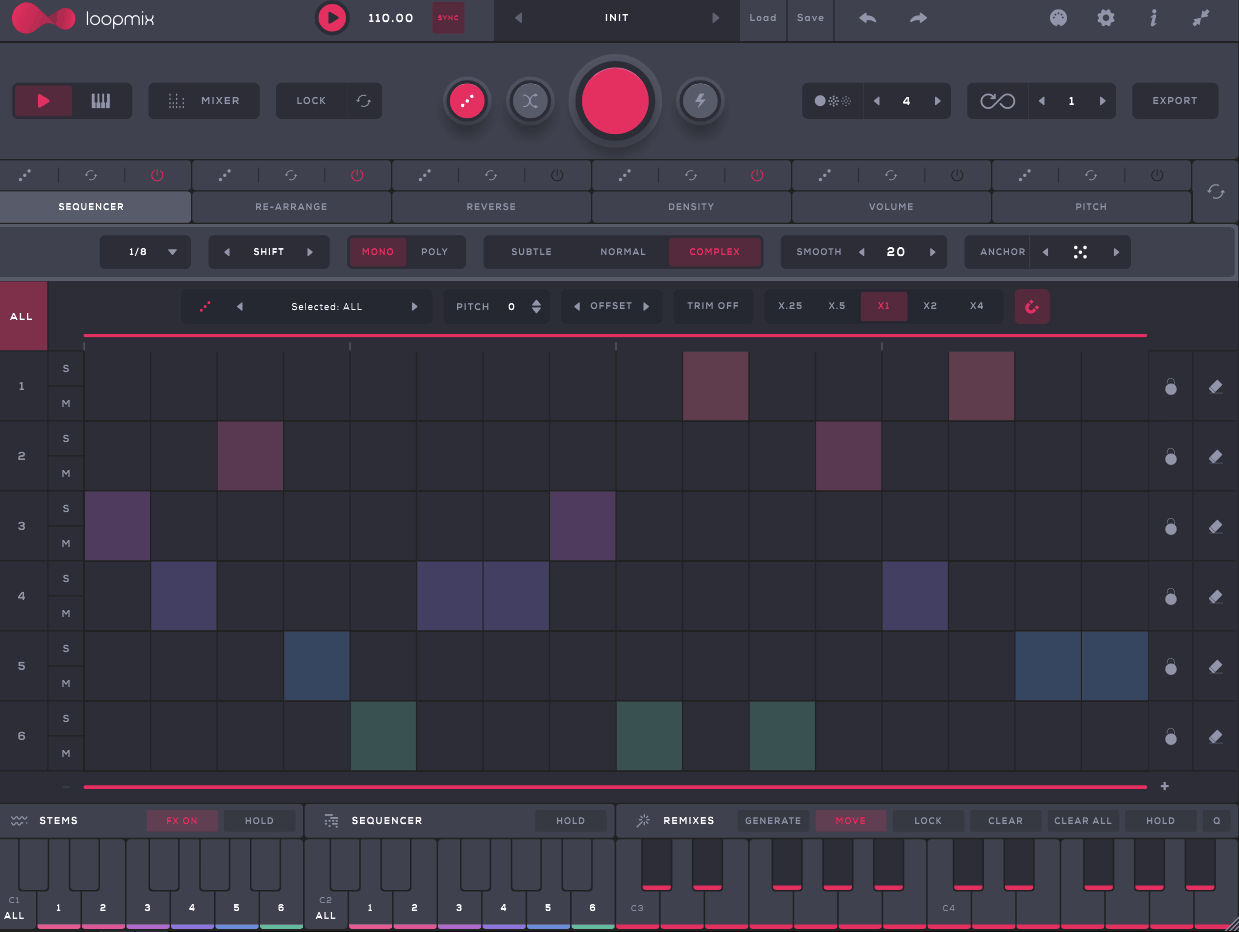
Audiomodern Loopmix lets you load up to six loops at once, and generate genuinely new hybrid variations from them in real time.
Beyond a basic randomize button, you get named algorithms like Remix, Infinity, and Disintegration, each producing a distinctly different flavor of variation. I’d recommend trying all three on the same loop set before settling on one.
- Smart Multifunctional Keyboard
A built-in keyboard spanning up to two octaves lets you trigger different remixes and full sequences live, which I think makes this genuinely usable in a performance context and not just a studio tool.
- MIDI Input Support
Loopmix accepts MIDI loops alongside audio, so you’re not limited to pre-recorded stems. You can build patterns from multiple different source types within the same session.
- Preset Pack Sharing
You can bundle your samples, patterns, and remixes into a single exportable pack complete with your own artwork and tagging. I like that sharing a fully custom setup with someone else takes one click instead of several separate file transfers.
11. Beatsurfing RANDOM Metal
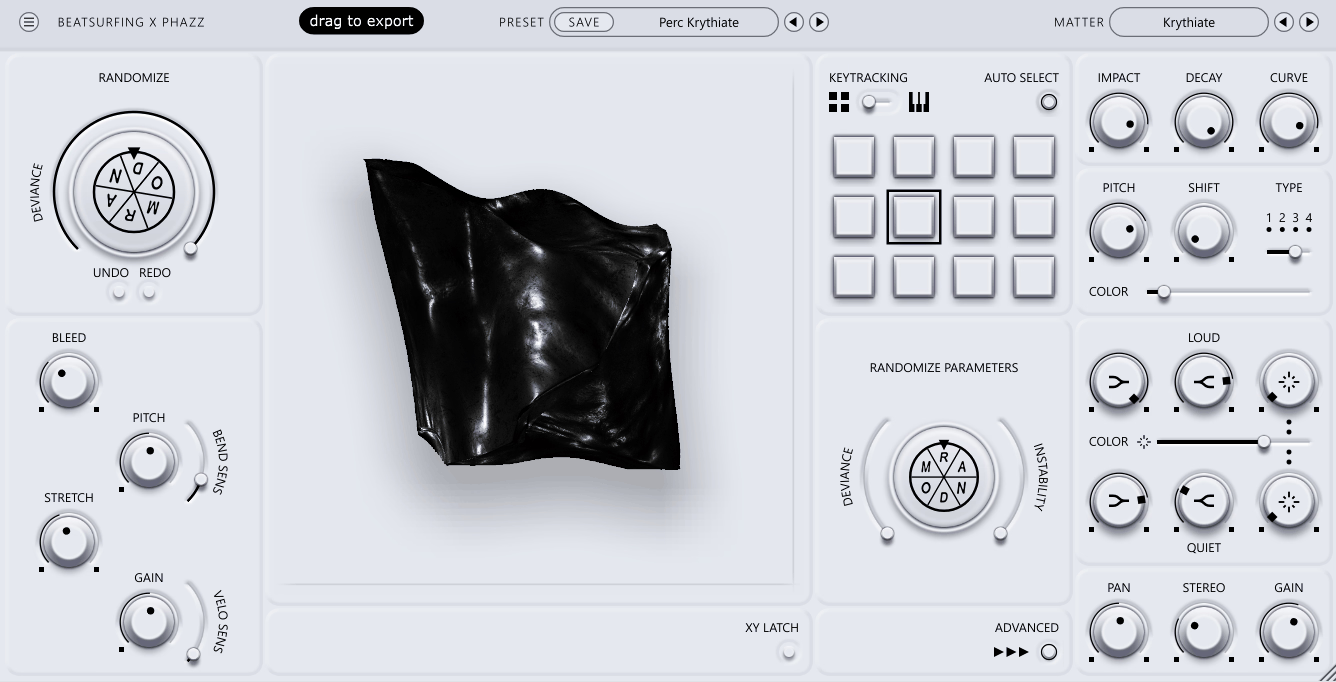
RANDOM already proved the neural-network-random-synthesis concept worked for melodic and textural sound design. RANDOM Metal was built specifically to take that same unpredictable engine and point it entirely at drums and percussion instead.
You get 12 pads that can run in Key Tracking Mode, playing the selected pad chromatically across your keyboard, or Traditional Mode, triggering a fixed sound per pad.
- Over 40 Percussive Engines
More than 40 different percussion engines are available across the pad grid, spanning metallic cymbals, shakers, and full tonal shots. I found the tonal-shot engines particularly useful once key tracking is switched on.
- Adjustable Randomization Deviance
Like the original RANDOM, an adjustable deviance amount controls how far each hit of the randomize button pushes the sound from its starting point. I’d recommend starting conservative before cranking it up.
- Drag to Export WAV
Once you land on a hit you like, you can drag it straight out of the plugin as a WAV file. This is a small workflow detail, but it means you’re never stuck with a great random hit trapped inside a single session.
- Expressive XY Pad With Latch Mode
The XY pad controls hundreds of parameters that vary by engine, and Latch mode determines whether your XY position updates continuously during a note or only at the moment the note triggers.

Hey, I’m Viliam, I started Music Circuit to write about plugins and gear, so you always know what’s new and what’s worth trying. You’ll also find guides and tips here to help you get started, whether you’re picking your first plugin or building out a full studio.