When you purchase through the links on my site, you support the site at no extra cost to you. Here is how it works.
Pitch correction went from a studio secret to a stylistic choice in the late nineties, and today it sits in almost every vocal chain. Whether you want subtle note fixing or obvious Auto-Tune artifacts, choosing the right tool depends largely on your workflow.
Below, I’ve rounded up the best autotune and pitch correction plugins for vocals, covering everything from subtle pitch fixes to the unmistakable Auto-Tune effect. I’ve separated real-time correction from detailed vocal editing, since tracking a singer calls for low latency and quick controls, while offline editing benefits from graphical note editing, formant control, and precise phrase-by-phrase correction.
Most automatic tuners here are designed for monophonic material, meaning one voice or instrument playing one note at a time. Melodyne is the major exception, using DNA (Direct Note Access) to edit individual notes in suitable polyphonic recordings. I’ve also included two free tuners worth trying.
1. Antares AutoTune 2026
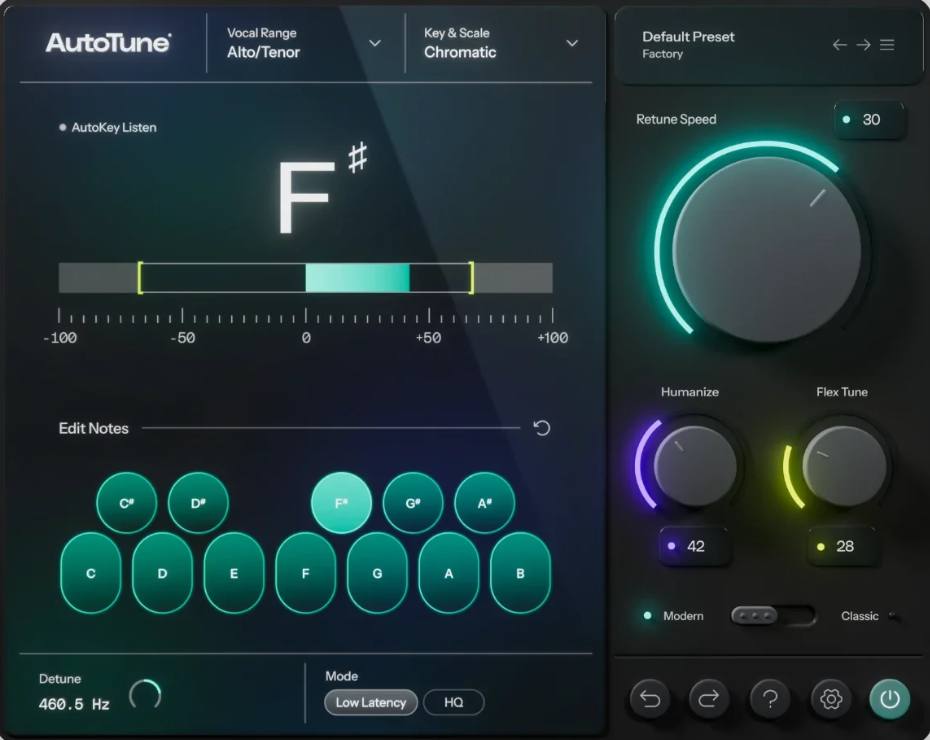
Antares essentially created the modern pitch-correction category, and Auto-Tune 2026 is its streamlined current real-time option. Auto-Tune Access and Auto-Tune Artist have been discontinued, leaving Auto-Tune 2026 and Auto-Tune Pro 11 aimed at different levels of workflow.
Where 2026 makes the most sense to me is fast vocal tuning without the complexity of a full graphical editor. If I’m recording a singer and want correction running immediately, I can choose the vocal range, set the key and scale, and start adjusting the main tuning controls without getting buried in editing tools.
- Classic and Modern Modes
Classic Mode is designed around the recognizable Auto-Tune character associated with fast, obvious pitch correction, while Modern Mode takes a more natural approach and adds controls such as Flex Tune and higher-quality formant processing.
I like having both approaches in the same plugin because they solve two very different problems. Classic is where I’d go when the tuning effect is supposed to be audible, while Modern makes more sense when I want to clean up a performance without making the processor the star of the vocal.
- Three Main Controls
The core workflow revolves around Retune Speed, Humanize, and Flex Tune.
Retune Speed controls how quickly the pitch is corrected. At very fast settings, the familiar robotic effect appears; at slower settings, the correction becomes less obvious.
Humanize is particularly useful on sustained notes because it allows longer notes to retain more natural movement rather than forcing every part of the performance into an identical correction response.
Flex Tune, available in Modern Mode, narrows the area in which automatic correction is applied. That makes it easier to keep some of the singer’s original pitch movement while still pulling genuinely out-of-tune notes toward the target.
- AutoKey 2 Sync
If you’re working with several Auto-Tune instances, Auto-Key 2 can detect the song’s key and scale and distribute that information to Auto-Tune plugins throughout the session.
2. Waves Tune Real-Time
The clue is in the name: Waves Tune Real-Time is designed first around real-time vocal correction, including studio tracking and live performance.
Waves emphasizes its zero-latency design, making it suitable for situations where the vocalist needs to hear the processed voice while performing. The plugin has also been used in SoundGrid-based live and broadcast environments, which explains why the workflow feels more concerned with tracking behavior than detailed offline editing.
What I find interesting is the amount of control hidden behind a relatively straightforward interface. The Tolerance section, for example, lets you decide how far a singer can move away from the target before correction takes over.
- Tolerance Thresholds
By default, correction is triggered when the detected pitch moves sufficiently far from the target note. The Tolerance Cents control adds to that threshold, while Tolerance Time can delay correction until the pitch has remained outside the threshold for a specified period.
For example, adding 10 cents of tolerance to the standard 50-cent threshold means correction doesn’t switch targets until the detected note reaches at least 60 cents away.
I find this particularly useful with singers who have a naturally expressive delivery. Rather than flattening every tiny movement, I can give the performance more room to breathe while keeping obvious pitch problems under control.
- Note Status States
The note grid lets you decide how individual notes behave, including whether they can be used as legal targets and whether correction should move toward them from above, below, or both directions.
That makes the scale editor much more useful than simply choosing C major and walking away.
- Real-Time Tracking
Waves Tune Real-Time is particularly convincing when used during recording because the singer can hear the pitch effect as they perform.
3. Brainworx bx_crispytuner
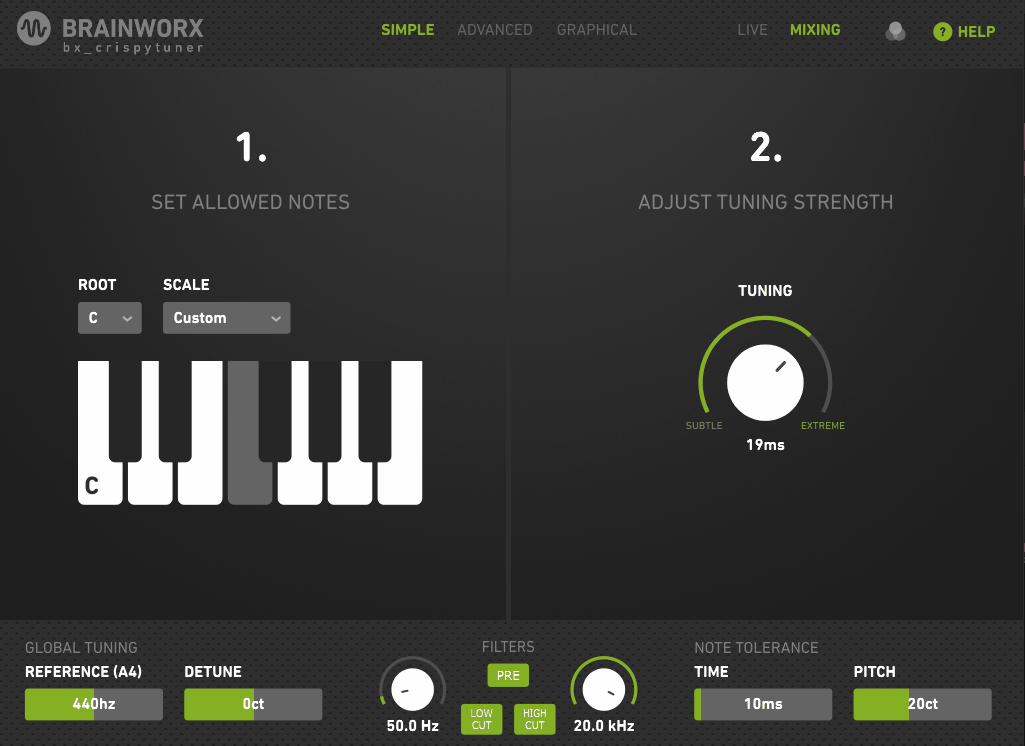
Brainworx took a useful approach with bx_crispytuner by allowing the interface to become more detailed as you need more control.
Simple Mode strips tuning down to the essentials: choose the correct scale and adjust the overall tuning intensity. That is genuinely all many vocals need.
Then you can move into more detailed modes when you want control over individual notes, transitions, correction strength, formants, and detection behavior.
The companion bx_crispyscale plugin can also help identify the song’s key and scale and pass that information to the tuner, which is useful if you’re less comfortable working out scales manually.
- Graphical Mode
This is the feature that moves bx_crispytuner beyond a basic real-time tuner. Graphical Mode gives you tools for working with individual notes and shaping their pitch movement rather than relying entirely on automatic correction.
- Live and Mixing Modes
The plugin provides different latency-oriented workflows for live use and mixing, making it easier to balance responsiveness against deeper processing.
For tracking, I want the lowest practical latency. For mixing, I care more about correction quality and control. Having those workflows separated means I don’t have to redesign the whole setup when moving from recording to production.
- Scale Presets
bx_crispytuner includes a collection of scale presets, along with controls for the root, transposition, tuning reference, and individual note enable/disable states.
- Advanced Parameters
Advanced Mode exposes controls for things such as transition time, tightness, correction amount, pitch-detection range, and formant handling.
I wouldn’t reach for these parameters during every vocal session, but they’re exactly what I want when the automatic result is close and needs some surgical adjustment.
The plugin also supports common professional formats, including AAX, AU, VST2, and VST3, without requiring a hardware dongle.
4. UnitedPlugins TrapTune
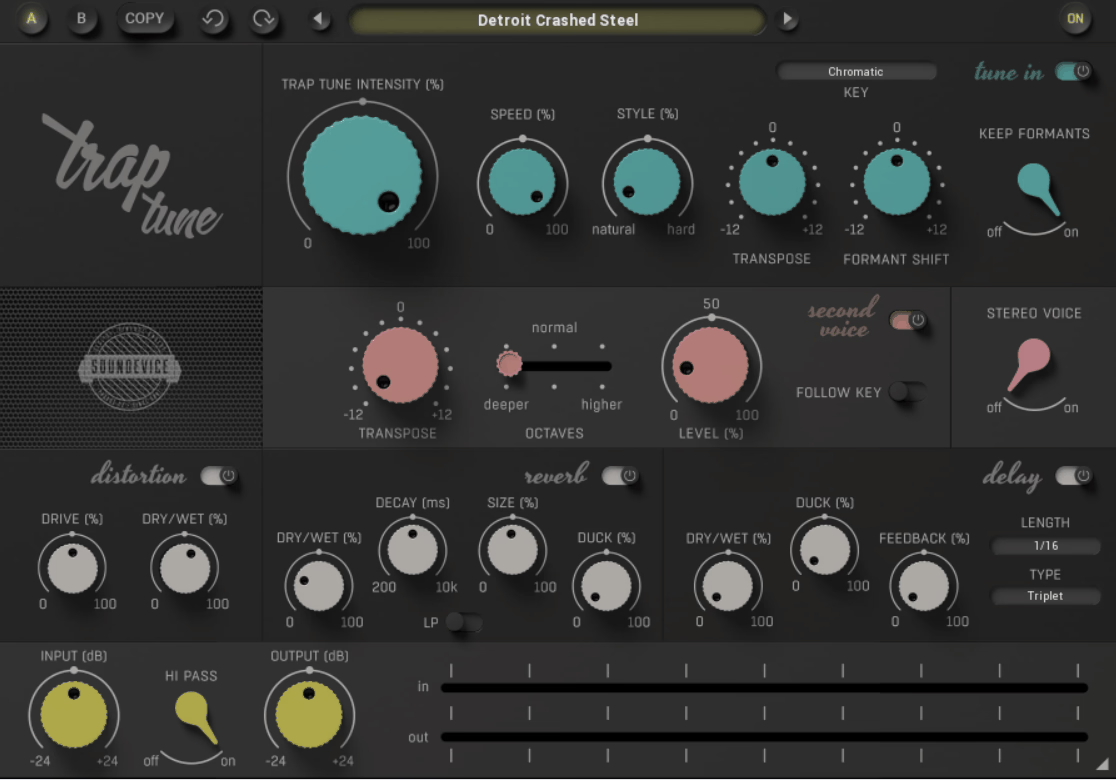
TrapTune from Soundevice Digital takes a different approach from the other automatic tuners here. Instead of treating pitch correction as the entire product, it combines tuning, harmony, doubling, distortion, delay, and reverb into one vocal-focused processor.
UnitedPlugins positions it toward trap, hip hop, R&B, contemporary pop, and EDM, but there’s nothing preventing you from using it elsewhere. The hard-tuned vocal sound is particularly obvious in those styles, which makes the plugin’s combination of correction and effects quite logical.
I see TrapTune as the option for producers who don’t want to build an entire vocal-effect chain around their tuner. You can correct the pitch and then immediately push the vocal toward a more produced sound without opening several additional plugins.
- Tune-In Section
The main Tune-In section contains controls for natural tuning intensity, tuning speed, hard-tuning character, transposition, formant behavior, and the target key.
I like the separation between natural tuning and harder correction because those are not really the same effect. A vocal can have subtle pitch cleanup while still receiving a deliberately artificial correction character on top.
The Transpose and formant controls also make it possible to push a vocal away from the original performance instead of merely fixing it.
- Second Voice
TrapTune can generate a second voice from the input and transpose it by semitones, including octave shifts.
I wouldn’t use this as a substitute for a well-recorded harmony every time, but it is useful when I want to turn a lead into something larger without tracking another performance.
For hooks and choruses, this can be a remarkably fast way to create additional width and harmonic movement.
- Vocal Distortion
The dedicated distortion section is voiced for vocals and can move from warm saturation to much more aggressive processing.
That makes the plugin more interesting than a tuner with a random distortion effect tacked onto the end. I can use the distortion to emphasize the tuned character itself, particularly when I’m deliberately chasing a more compressed, aggressive modern vocal sound.
5. Slate Digital MetaTune
Slate Digital designed MetaTune around the fast, hard-tuned vocal sound, and that focus is obvious from the interface.
The main controls are deliberately simple: Speed, Amount, Sustain, and Note Stabilizer, with a visual display showing the detected and corrected pitch.
What makes MetaTune more unusual is its negative Speed range. Normal fast retuning reaches the famous robotic effect, but MetaTune can go beyond conventional zero-millisecond settings into negative values for an even more aggressive character.
I wouldn’t use that mode on every vocal, but when I want the tuning itself to be unmistakably audible, it’s one of the more interesting options here.
- HeatMaps
The pitch display includes HeatMaps showing where incoming notes tend to land compared with where corrected notes are being moved. That gives you more information than a simple note indicator.
- Note Stabilizer
Fast pitch correction can create flutter when the tuner starts reacting to short passing notes, vibrato, or tiny pitch movements.
Note Stabilizer addresses that by ignoring notes below a selected duration. The available settings ignore notes shorter than roughly 40 ms, 80 ms, or 200 ms, depending on the selected mode.
The trade-off is significant: enabling Note Stabilizer introduces around 280 ms of latency, which is why it is disabled in Low Latency mode.
- Negative Speed
MetaTune’s Speed control can move below zero, down to approximately -3 ms.
That sounds like a tiny technical detail, but you can actually hear the difference when the tuning effect is being pushed hard. Combined with Note Stabilizer, the plugin can create an extremely rigid tuning character while avoiding some of the flutter that normally appears when retuning very quickly.
For modern trap, hip hop, pop, and electronic vocals, this is the feature that makes MetaTune genuinely distinct.
- Built-In Doubler
MetaTune also has a Doubler that creates additional tuned voices around the original. It’s not a replacement for real double-tracking, but it can be useful when I need instant vocal width.
6. Celemony Melodyne
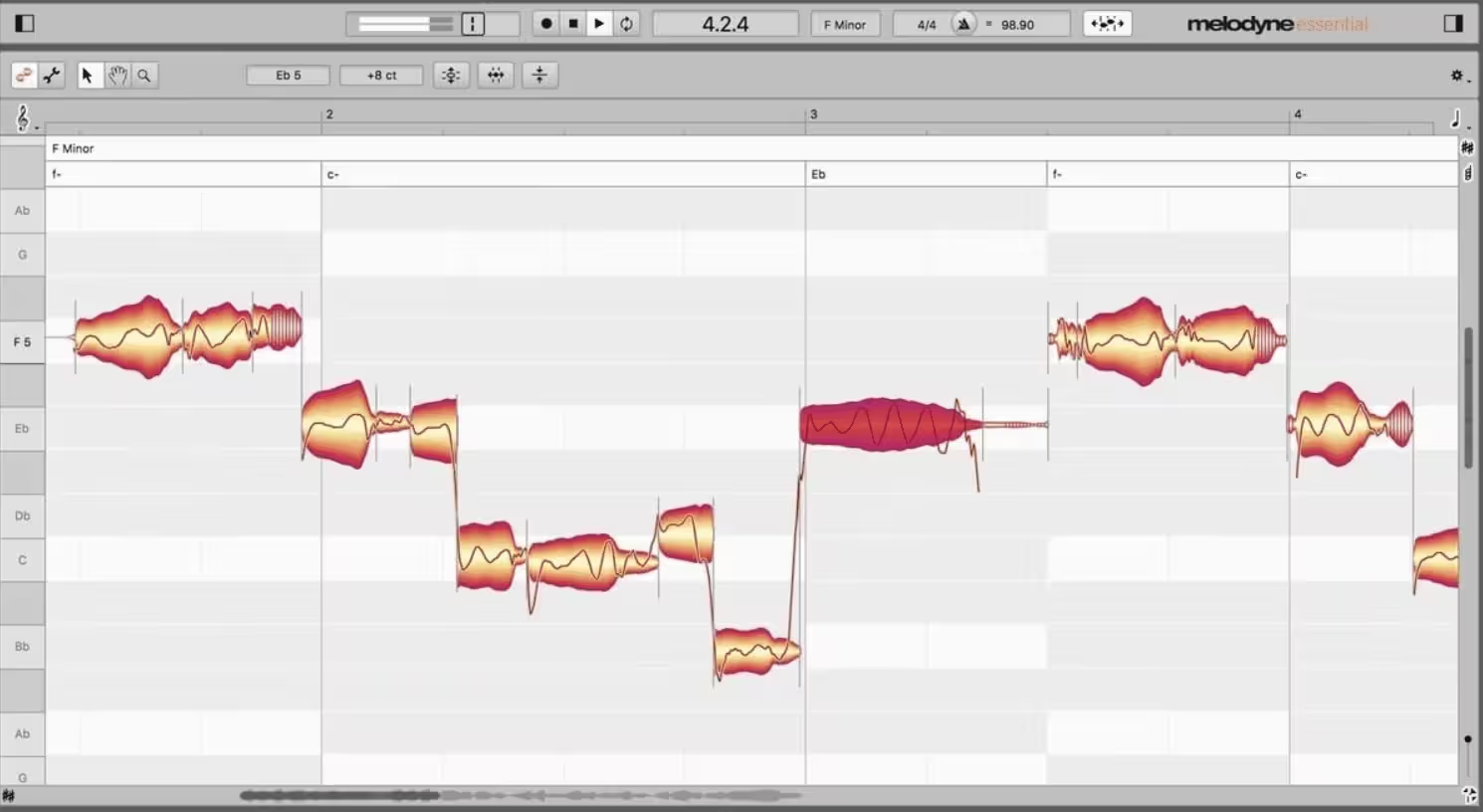
Every automatic tuner here essentially decides where a note should go and moves it there. Melodyne takes a different approach: it gives me the individual notes as editable objects and lets me decide exactly what happens to them.
That makes Melodyne the obvious choice when pitch correction is only one part of the job. You can reshape pitch, timing, note transitions, vibrato, formants, and other characteristics without applying the same correction behavior to the whole performance.
The workflow takes longer than dropping Auto-Tune on a vocal and pressing play, but I wouldn’t consider that a disadvantage. When I’m repairing a carefully recorded performance, I often want more control, not more automation.
Melodyne also supports ARA, allowing compatible DAWs to communicate directly with the editor instead of treating it like a conventional real-time insert.
- Three Core Pitch Tools
Melodyne separates pitch work into controls for Pitch Center, Pitch Modulation, and Pitch Drift.
That distinction is extremely useful.
Pitch Center moves the note toward the intended pitch. Pitch Modulation controls the smaller fluctuations inside the note, such as vibrato, while Pitch Drift addresses gradual movement across the length of a sustained note.
This is why Melodyne can sound much more natural than simply forcing a vocal onto a scale. I can correct the center while leaving the singer’s vibrato intact.
- DNA Direct Note Access
In compatible editions, DNA (Direct Note Access) can analyze suitable polyphonic recordings and expose individual notes inside chords.
That makes Melodyne useful beyond vocal tuning. I can work on piano, guitar, and other polyphonic material, changing individual notes rather than treating an entire chord as one inseparable sound.
For example, I can change a note inside a chord to alter the harmony without having to replay the entire recording.
Nothing else on this list offers that kind of polyphonic note access.
- Sibilant Handling
Melodyne’s vocal-oriented algorithms distinguish between pitched material and unpitched components such as sibilants, helping prevent consonants from being dragged around by the pitch-processing system. Sibilant Balance control lets me adjust the relationship between those components.
Freebies:
Auburn Sounds Graillon 3
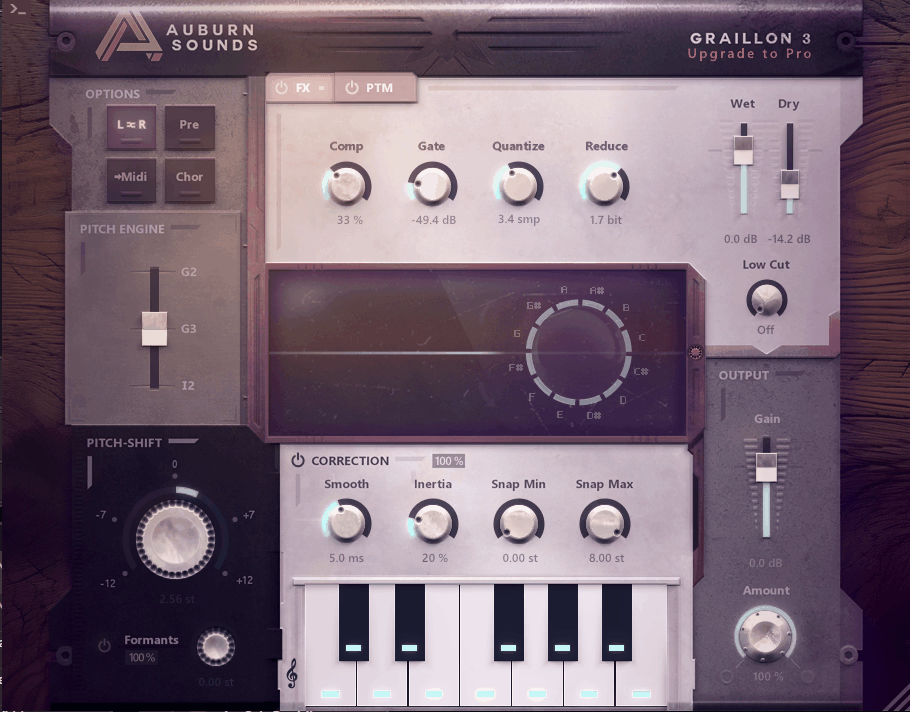
Graillon 3 is one of the free vocal tuners I continue to recommend because the Free Edition keeps the core pitch-correction functionality intact rather than turning the plugin into a restricted demo.
The current generation also builds on the sound and technology of earlier Graillon versions. Auburn Sounds now offers several pitch engines, including the G2 and newer G3/I-series engines, while retaining the older G2 character for users who liked the previous version.
It’s primarily aimed at voice, and Auburn Sounds is unusually clear about that. The plugin can technically be experimented with on other material, but its pitch detection and processing are designed around singing voice.
- Five Correction Controls
The pitch-correction section gives you controls for Inertia, Smooth, Snap Range, Reference, and Correction Amount, alongside a keyboard for selecting the notes that should be considered valid targets.
Inertia is particularly important because it determines how strongly the correction stays attached to the chosen target rather than jumping between neighboring notes.
- Multiple Pitch Engines
Graillon 3 includes three pitch-processing engines, giving you different approaches to the correction and shifting behavior.
That is useful because pitch correction doesn’t have one universal sound. Some algorithms preserve the voice more naturally, while others produce more obvious artifacts that can be useful as an effect.
- Pitch-Tracking Modulation
Graillon’s PTM (Pitch-Tracking Modulation) is one of the plugin’s most distinctive creative features.
GVST GSnap
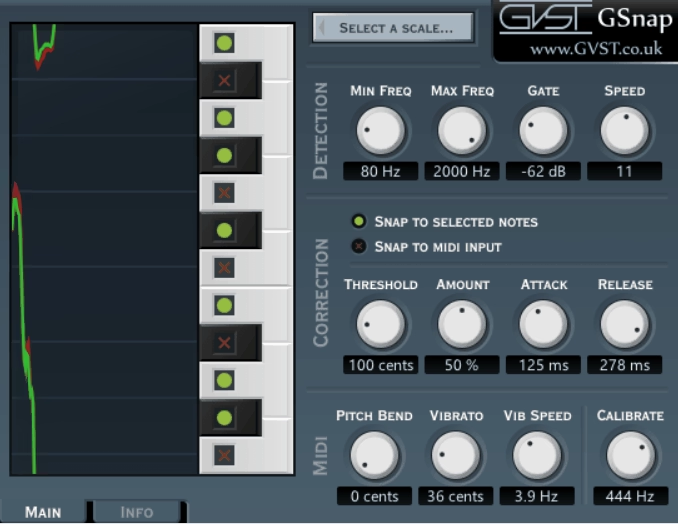
GSnap has been around for years, but it remains useful precisely because it is simple, lightweight, and free.
There is no elaborate graphical editor and no attempt to turn the plugin into a full vocal-production suite. It gives you detection, correction, MIDI control, and a straightforward pitch display.
It also has one important limitation that makes it worth mentioning up front: GSnap is intended for monophonic input, such as a vocal or single melodic instrument. It isn’t designed to analyze chords.
The interface may look old-fashioned compared with newer tuners, but that doesn’t make its basic pitch-correction system any less useful.
- Detection Section
The Min Frequency and Max Frequency controls tell GSnap what pitch range it should concentrate on, while the Gate control helps prevent very quiet background material from triggering the detector.
- Threshold Zones
The Threshold setting controls how close the incoming pitch needs to be to a target before GSnap moves it there.
- Fixed and MIDI Correction
GSnap provides both Fixed and MIDI correction modes.
Fixed mode tunes the incoming audio toward the notes you’ve selected on its keyboard. MIDI mode instead lets incoming MIDI notes determine the targets, which turns GSnap from a simple scale-based tuner into something more experimental.
That can be useful when you want to rewrite the melody rather than merely correct it, especially when the vocal is simple enough to follow a clearly defined MIDI line.
Final Thoughts
Pitch correction isn’t really one job, which is why I wouldn’t recommend one plugin for every vocalist.
For fast real-time correction, I’d start with Auto-Tune 2026 or Waves Tune Real-Time. Both make sense when the singer needs to hear the processing immediately and you don’t want to spend half the session editing individual notes.
bx_crispytuner sits nicely between automatic correction and more detailed editing, especially if you like the idea of starting simple and revealing more controls only when you need them.
For a vocal that needs an intentionally aggressive, modern tuning sound, MetaTune is one of the most interesting choices here. Its negative Speed range and Note Stabilizer give it a particularly distinctive approach to hard tuning.
TrapTune is the specialist I’d look at when I want tuning and vocal effects in the same plugin. It makes more sense for producers who want a quick route from a dry vocal to a more finished trap/pop-style sound.
Then there’s Melodyne, which I wouldn’t compare directly with the automatic tuners at all. When I’m fixing individual notes, preserving natural vibrato, editing timing, or working with polyphonic recordings, its note-level control is in another category.
For free options, Graillon 3 is the one I’d install first when I want something more creative than a basic tuner, while GSnap is still a useful choice when all I need is straightforward pitch correction without spending anything.
The main thing I’d keep in mind is that pitch correction should support the performance rather than automatically erase everything that makes it human. Fast retune speeds, narrow correction ranges, and hard tuning can sound great when they’re intentional. For natural vocals, the best result is often the one where the listener never realizes the plugin was there.

Hey, I’m Viliam, I started Music Circuit to write about plugins and gear, so you always know what’s new and what’s worth trying. You’ll also find guides and tips here to help you get started, whether you’re picking your first plugin or building out a full studio.