If you’ve ever recorded a kick drum with two mics, layered a DI with a re-amped signal, or mixed a scene with a boom and a lav, you’ve probably run into this: everything sounds fine in solo, then you sum it together and suddenly the low end disappears or the whole thing sounds thin and hollow.
That’s phase cancellation, and it’s one of those problems that doesn’t announce itself. You just end up reaching for more EQ, more compression, more of everything, without realizing the actual issue is timing, not tone.
The eight plugins below approach this from different angles. Some, like Melda MAutoAlign and Auto-Align Post 2, automate the detection and correction for you, which is genuinely useful when you’re dealing with a full drum kit or a dialogue-heavy film session and don’t have time to nudge every track by ear.
Others, like SSL X-Phase and MAAT RSPhaseShifter, are built for manual, surgical control, letting you dial in a specific frequency where two sources are fighting each other.
A few, like Waves Sub Align and Eventide Precision Time Align, solve more specific problems: one’s built for live sound and PA alignment, the other for sub-sample timing precision on multi-mic’d sources.
1. Waves InPhase
Phase problems are sneaky because they never announce themselves as an obvious mistake.
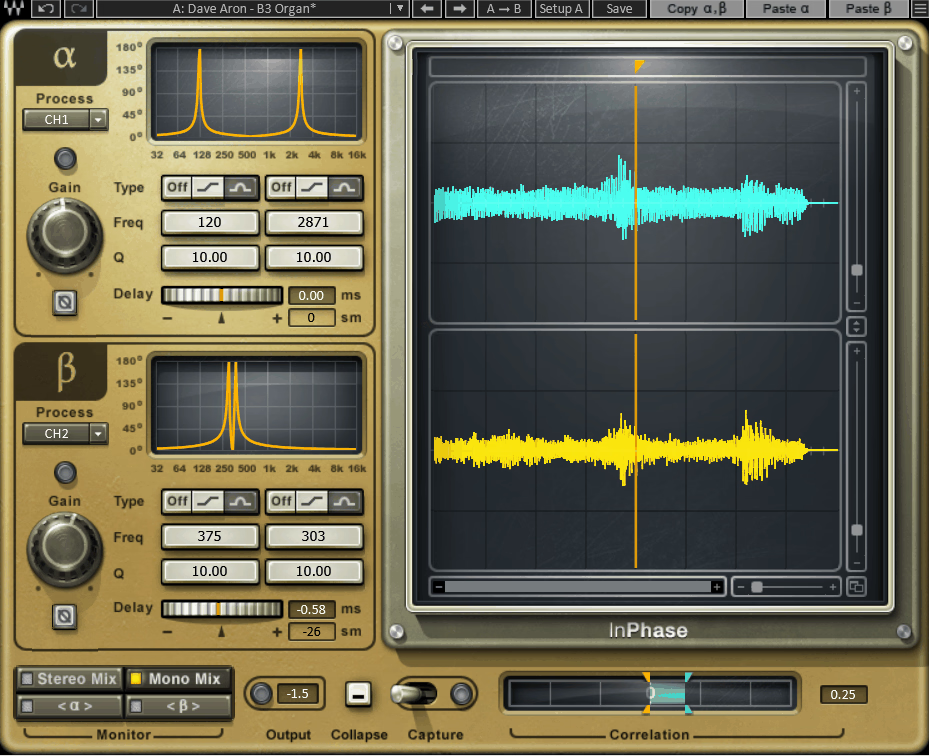
InPhase is Waves’ answer to that problem, quietly draining punch and clarity out of a track until you go looking for the reason, usually after you’ve already spent an hour wondering why a bass or a pair of overheads sounds thinner than it should.
- Eight dedicated components for every workflow
InPhase comes as Mono, Stereo, LT Mono, LT Stereo, Live Mono, Live Stereo, Live LT Mono, and Live LT Stereo, letting you pick the exact configuration your session needs instead of one bloated plugin trying to do everything.
The LT versions strip out the deeper filter controls for a simplified, faster workflow when you don’t need full manual precision, which is genuinely handy when you’re moving fast through a session and just need a quick fix rather than a deep dive.
- Dual allpass filters
You get a 1st order filter for a 90 degree phase shift and a 2nd order Bell filter for a full 180 degree shift, with Q controlling how narrow or wide that correction reaches across the frequency spectrum, which lets you target a specific problem frequency without dragging the rest of the signal along with it.
- Capture based waveform analysis
Hitting Capture grabs up to 2 seconds of audio at 44.1 or 48kHz, or 1 second at 88.2 or 96kHz, and Automatic mode waits for a peak above -40dBFS before it starts recording, so you’re not manually timing the capture yourself.
Manual mode gives you direct start and stop control instead, which I’d reach for on more unpredictable material where the automatic threshold might miss the moment you actually want captured.
- Sidechain alignment against a reference track
- Correlation meter
This is genuinely the fastest way to know if you’re helping or hurting, since a reading near 1 means strong correlation and anything drifting toward -1 means the signals are working against each other, with blue and orange correlation markers tracking the peak positive and negative values you’ve hit throughout playback.
2. SSL X-Phase
Most engineers reach for a phase flip first. A 180 degree flip treats every frequency the same way though, which is exactly the blunt approach X-Phase was built to replace.
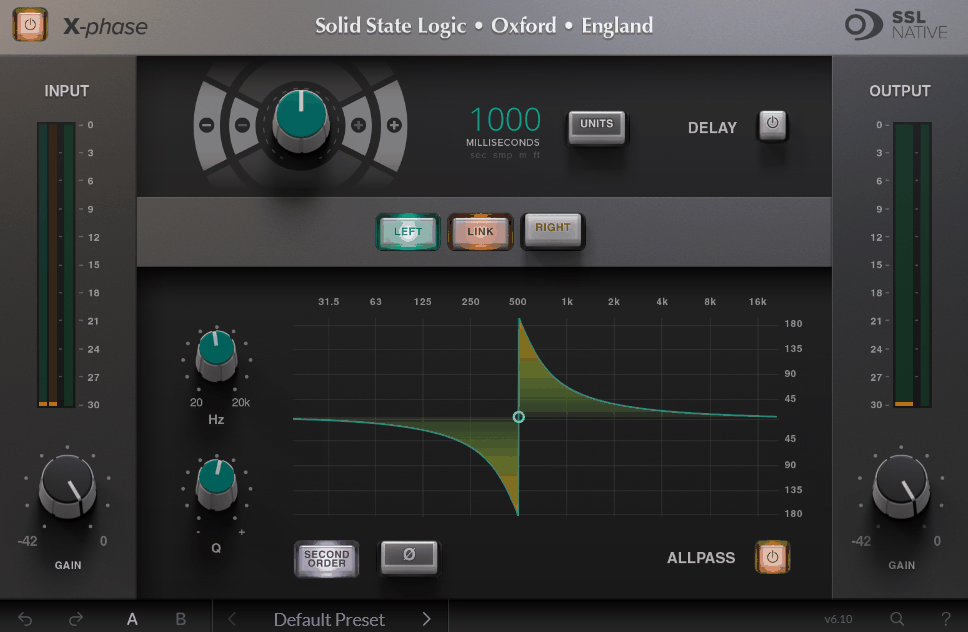
Solid State Logic designed this as a manual all-pass filter, meaning gain stays completely flat while only the phase relationship shifts.
- Frequency Range
You get control across the full 20Hz to 20kHz spectrum, letting you target the exact frequency where two mics are fighting each other instead of shifting the whole signal at once.
I found this genuinely useful on a snare top and bottom, since those two mics carry completely different harmonic content and never behave like simple inverses of each other.
- Q-Factor
This sets how narrow or wide the phase correction reaches across the spectrum. Personally, I think this is where the real precision lives, because you can go surgical on one problem frequency or spread the correction more broadly depending on what the source actually needs.
- 2nd Order Mode
Flipping to 2nd Order inverts the filter for a more aggressive correction when a standard first order adjustment isn’t cutting through the problem. I’d say this is worth reaching for once you notice the standard setting just isn’t doing enough on its own.
- Flexible Delay
The separate Delay section works independently from the all-pass filter, and you can dial in timing using seconds, milliseconds, samples, meters, or feet.
From my experience, working in feet actually makes the most sense when you’re aligning a DI to an amp mic, since you can estimate the physical distance and dial it straight in.
3. Sound Radix Auto-Align Post 2
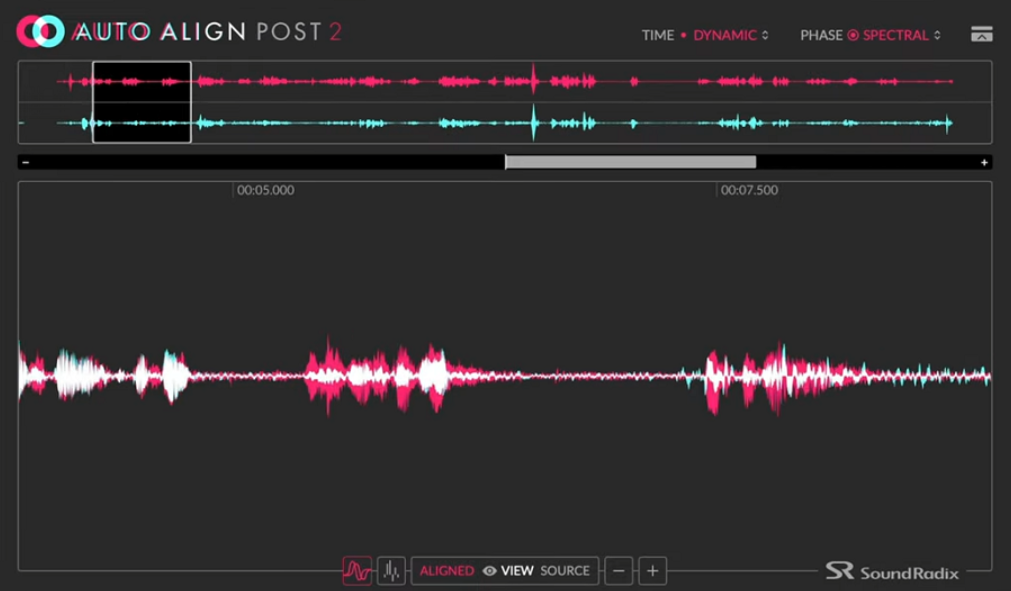
Auto-Align Post 2 was built specifically for a problem that plagues almost every film and TV production: boom mics and lavalier mics picking up the same line at slightly different times. Since actors move, turn their heads, and drift toward or away from the boom throughout a take, that timing gap never stays fixed the way it does with two locked-off studio mics.
This is where Sound Radix took a genuinely different approach than most phase tools. Rather than treating alignment as a one-time fix, Dynamic Mode continuously tracks and corrects that shifting time relationship as the actor moves, while Static Mode handles the simpler case of stationary mics that just need a single fixed correction.
I think the detail that separates this from a basic time-alignment tool is the Spectral Phase Correction Module, which tackles phase problems that come from filters rather than timing.
- Time Range
You get correction up to ±100ms, covering microphone distances of roughly 112 feet, or about 34 meters.
- Spectral View
A magnifying glass display breaks phase correlation down across 28 frequency bands, giving you a genuinely detailed look at exactly where two signals are fighting each other, rather than a single vague meter reading that leaves you guessing which part of the spectrum is actually the problem.
- Correction Modes
Dynamic Mode continuously adjusts phase and timing for moving sources like a boom operator following actors around a set.
- Platform Support
Beyond AAX for Pro Tools, it runs as ARA2-VST3 in DAWs like Nuendo and Studio One, includes a dedicated Adobe Premiere Pro extension, and added native support for Blackmagic’s DaVinci Resolve Studio in version 2.3, which rounds out a genuinely wide net of supported post-production environments most competing phase tools don’t bother covering.
4. Melda MAutoAlign
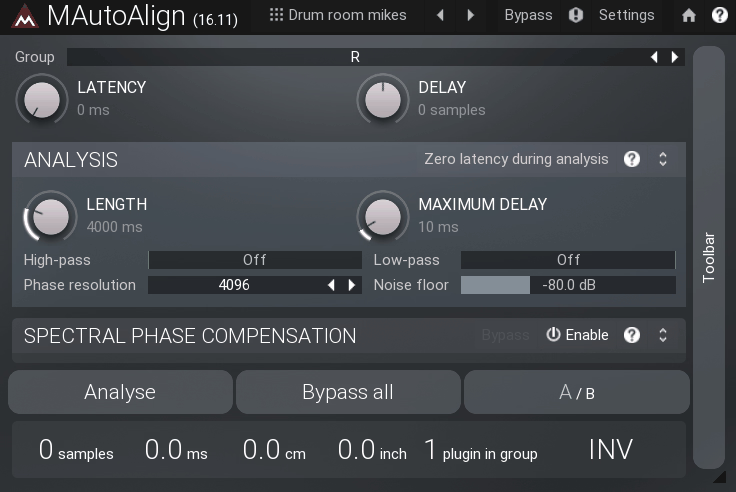
Recording with more than one mic almost guarantees phase cancellation somewhere in your session. MAutoAlign deals with that by finding the ideal delay and polarity for each track on its own, so you’re not stuck manually hunting for the right offset by ear on every single track.
I’ve seen mixed opinions on this one. Some engineers run it daily on live drum multitracks and swear by how fast it gets them a usable results while others find it takes a couple of passes per session, since the analysis only listens to a short window of audio each time you run it.
That means results can shift a bit depending on exactly what’s playing during that capture window.
Key Features
- Automatic Detection
You drop an instance on each track you want fixed and click a button. No manual routing or sidechaining is needed, since MAutoAlign finds every other instance of itself running in the session automatically.
I think this is genuinely where the plugin earns its reputation. It removes the tedious back and forth of nudging tracks against each other one at a time by hand.
- Transparent Processing
By default, it only touches delay and polarity inversion, with no filtering applied that would color or alter the signal.
- Spectral Phase Compensation
Since version 11.02, MAutoAlign estimates the ideal phase rotation for each frequency across every track, not just overall delay and polarity.
I’d say that’s genuinely useful because it can compensate for phase differences introduced by the physical shape of the instrument, the mics themselves, or EQ you’ve already applied before the plugin.
In practice, that means you can equalize your tracks afterward without reintroducing new phase cancellation problems.
- Multichannel Support
Lastly, MAutoAlign covers M/S and surround formats alongside standard channel modes. So it’s not limited to simple stereo pairs if your session involves a more complex mic setup.
5. FLUX Evo In (part of bundle)
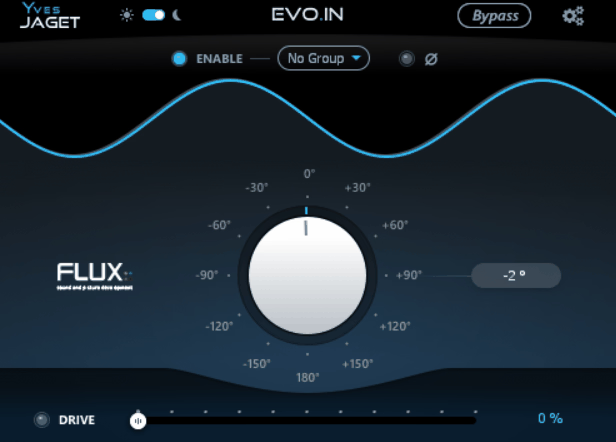
FLUX Evo In is the plugin I would recommend for dealing with multi-mic recordings where the tracks just won’t sit together cleanly.
It combines phase rotation with a saturation stage, and once you get familiar with the grouping system, it becomes genuinely fast to work with rather than a fussy technical chore.
What you’re solving here is comb filtering, the frequency cancellation that happens when multiple mics capture the same source at slightly different distances.
Instead of a blunt polarity flip, you get precise arbitrary and linear phase rotation through all-pass filters, and I must say it’s far more musical than nudging clips in the timeline and hoping I landed in the right spot.
- Phase Rotation
You control this through a jog wheel that sweeps the rotation smoothly, letting you shift phase gradually at specific frequencies rather than uniformly across the whole spectrum.
I listen as I adjust, and you can actually hear the low end filling back in and the comb filtering dissolving in real time. The classic polarity inverter is also built in for the simpler 180-degree flip when that’s all a track needs.
- Grouping System
This is what makes the whole workflow click for me. You assign every mic track from the same source, say a drum kit or a guitar cab with multiple mics, to the same Group Number, then toggle phase correction on or off for the entire group from any single instance.
That lets you compare the full combined sound instantly instead of clicking through each track one at a time.
- Drive Saturation
The Drive stage adds soft saturation that restores harmonic content lost somewhere in the recording chain before the signal reaches your DAW.
It’s designed to add warmth without crossing into audible distortion, and I keep it around 60-70% of its range on drums and acoustic sources where you want the track to feel more like the instrument in the room again.
- Immersive Format Support
You get support for up to 16 channels, covering Dolby Atmos 7.1.2 and 7.0.2 track and bus formats plus Third Order Ambisonics, and the plugin handles sampling rates up to 384kHz (DXD).
If you work in surround or immersive mixing, this means you don’t need to stack multiple instances or find workarounds just to keep phase coherent across a large channel count.
Sadly, plugin cannot be bought separately, only as a part of a bundle so keep that in mind!
6. Waves Sub Align
Playing small venues means dealing with PA systems where the subs and tops don’t line up, and you rarely get access to the house system’s processor to fix it properly.
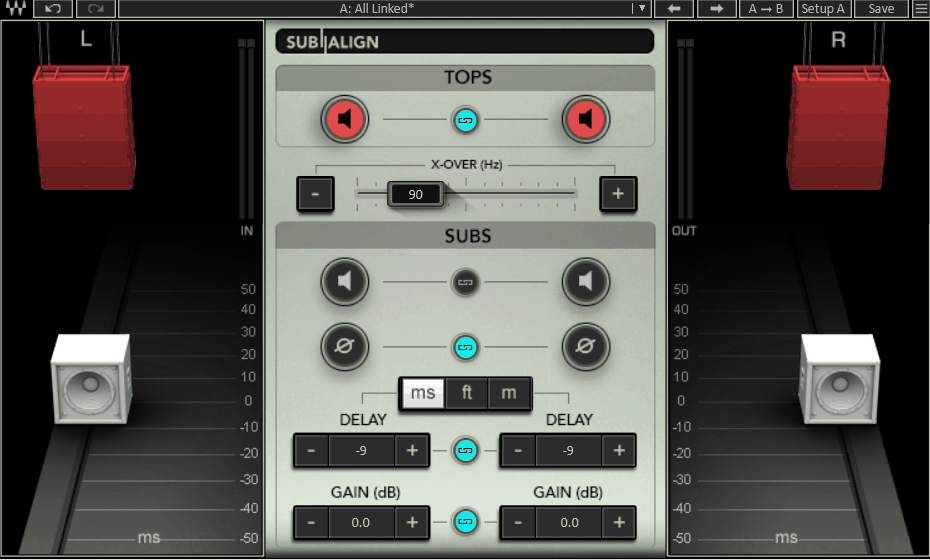
Waves Sub Align inserts on your master bus and virtually “moves” the subs in relation to the tops, giving you phase alignment control you’d normally only get by touching the actual crossover hardware.
I’ve found this genuinely useful on gigs where the venue’s setup is fixed and I have no way to adjust anything upstream.
- Crossover Match
The Over-X control sweeps between 40Hz and 250Hz, defaulting to 90Hz, letting you match the PA’s internal crossover point.
Getting this right matters because it determines which frequencies actually get shifted, so you’re not delaying content that never reaches the sub in the first place.
- Delay Control
You get delay adjustment across three unit types: milliseconds (±50ms), feet (±56ft), or meters (±17m), whichever makes more sense for how you think about the room.
I switch to feet when I’m working out physical distance between the sub and tops on site, since it maps directly to what I’m measuring with a tape.
- Phase Flip
A simple 180-degree polarity switch for the subs, accessible with one click. This is the fastest first move I make when something sounds hollow or thin, since flipping polarity before touching delay tells you immediately whether you’re dealing with a phase problem at all.
- Gain Trim
Subwoofer output gain ranges from -∞ to +18dB, giving you enough headroom to balance the sub level against the tops without needing a separate gain stage. You can fine-tune with the +/- controls once you’re in the right ballpark.
- Stereo Linking
On the stereo version, every control (Solo, Phase, Delay, Gain) has a Link icon that ties left and right channels together.
I leave this linked for most gigs since PA subs are usually run as a mono sum anyway, but having the option to break the link is there if the system calls for independent L/R treatment.
7. MAAT RSPhaseShifter
Multi-mic’d sources can sound thin or hollow even when everything’s positioned well, and no amount of EQ fixes it because the problem isn’t tonal, it’s phase.
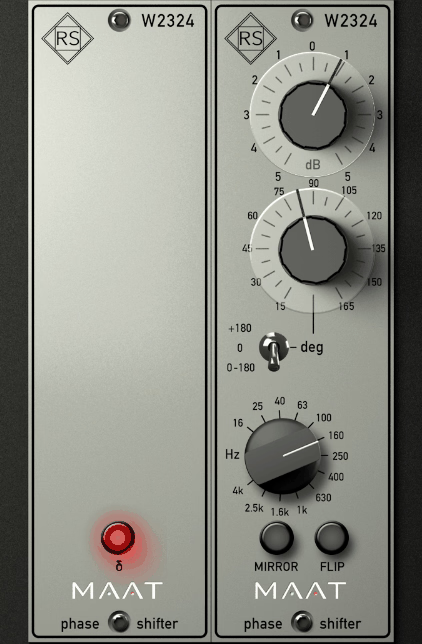
RSPhaseShifter is a 64-bit digital recreation of Roger Schult’s analog W2324 hardware, and it’s an explicit circuit recreation so you get the same phase-shifting behavior without the noise or coloration analog gear normally adds.
- Phase Angle
You get eleven tick marks in 15-degree steps, from 15° up to 180°, controlling how much phase shift gets applied at your chosen frequency. I find sweeping through this while listening is the fastest way to find where two competing tracks suddenly click into place, since you’re essentially building a complex comb filter you couldn’t replicate with a standard EQ.
- Resonant Frequency
An ELMA-style stepped control with 13 frequency positions lets you target exactly where the phase shift happens, and you can toggle between stepped (for repeatable settings) or continuous adjustment depending on whether you’re recalling a setting or hunting by ear.
- Delta Mode
This lets you isolate and hear only the portion of the signal that’s being altered, which is genuinely useful for MS workflows where you’re deliberately manipulating stereo spread.
Combined with MIRROR mode for ganging both stereo channels together (and FLIP for quick A/B comparisons), you can dial in wide, deliberate phase effects on a stereo buss in seconds rather than guessing at settings blind.
8. Eventide Precision Time Align
Precision Time Align is what I reach for when standard DAW sample-editing just isn’t precise enough to fix a phase problem.
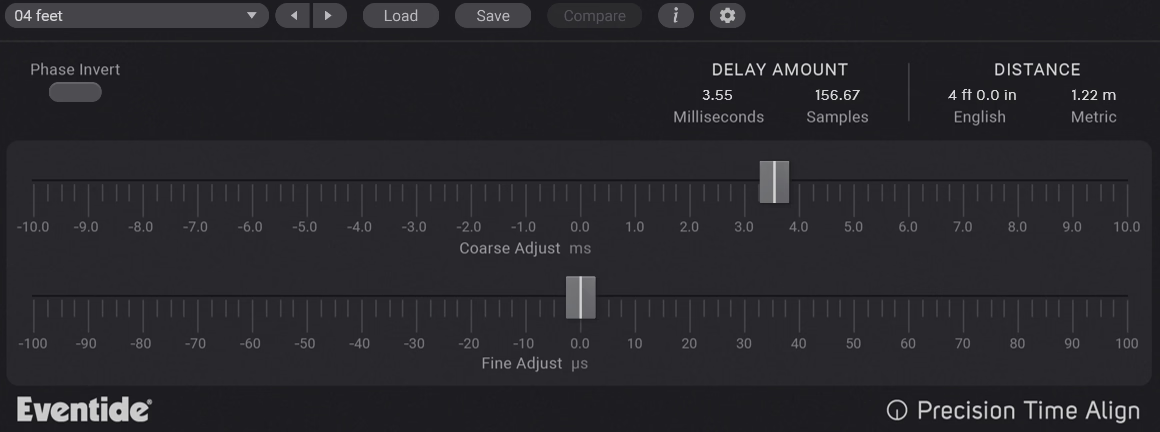
This is a sub-sample delay tool built specifically for multi-mic’d recordings, where even microscopic timing offsets between mics create comb filtering or a hollow, phased sound when you sum them together.
Key Features:
- 1/64th Sample Resolution
The plugin syncs signals to microsecond accuracy, at up to 1/64th of a sample, which is roughly 64 times finer than what you can do by manually nudging clips in your DAW’s timeline.
On kick drums with in and out mics, this resolution is often the difference between a track that just sounds “fine” and one where the low end actually locks together.
- Coarse and Fine Controls
You get separate Coarse and Fine controls for dialing in the time shift, so you can get roughly in the right zone quickly, then fine-tune by ear once you’re close.
I use Coarse to get the obvious offset out of the way, then switch to Fine and sweep slowly while listening for where the low end fills back in.
- Negative Delay
Unlike a standard delay plugin, you can shift a track backward or forward in time relative to the others, not just push it later.
This matters because you don’t always know in advance which mic arrived first, so having the option to move a track earlier rather than only later saves you from having to guess and reroute your session.
- Phase Invert with Four Calibration Methods
There’s a dedicated Phase Invert button for fixing mirror-image acoustical phasing, plus four different calibration methods to help you match signals precisely depending on your source material.
I treat this as step one before touching the delay controls, since flipping polarity first tells you immediately whether you’re dealing with a phase problem at all before you start dialing in timing.

Hey, I started Music Circuit to write about plugins and gear, so you always know what’s new and what’s worth trying. You’ll also find guides and tips here to help you get started, whether you’re picking your first plugin or building out a full studio.