Polyverse makes effects that sit at the more experimental end of the market, and Manipulator is their most distinctive release.
It’s a real-time pitch and formant processor built around granular processing, harmonic shifting, and MIDI-triggered pitch control, and it’s designed specifically for transforming vocal and monophonic audio into something that can range from subtle enhancement to completely unrecognizable.
The useful framing is that Manipulator isn’t a conventional pitch shifter or a harmonizer in the traditional sense. It’s a vocal transformation tool/vocoder with a specific character, and understanding that character is the key to knowing whether it belongs in your setup.
Processing Engine
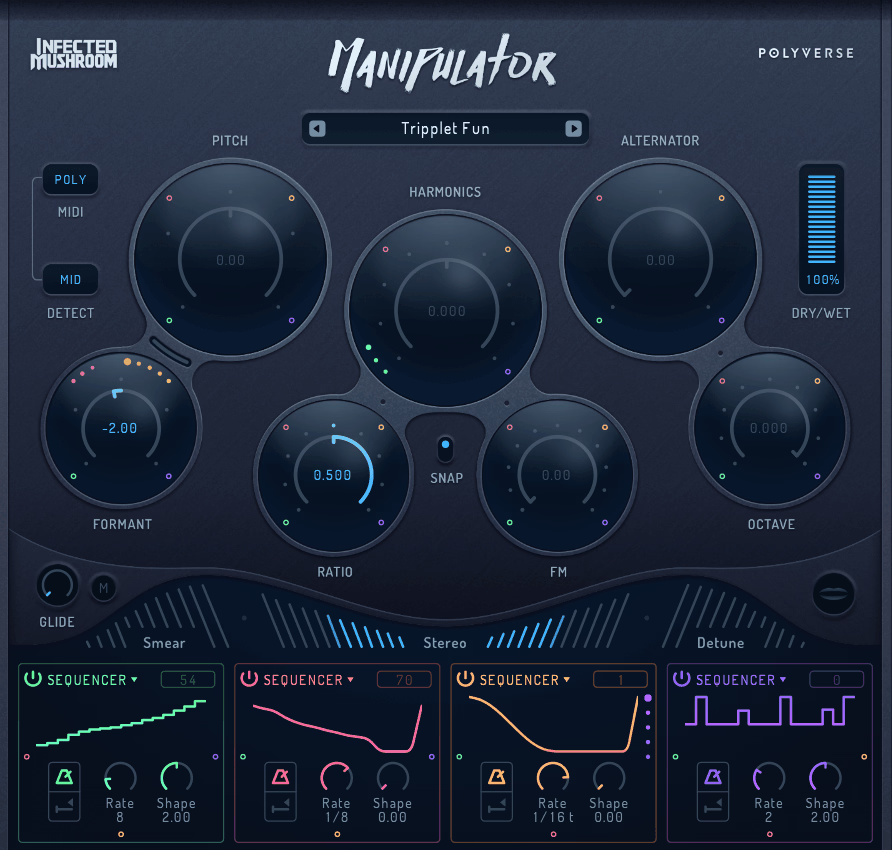
Polyverse Manipulator combines pitch shifting, formant shifting, harmonic shifting, and granular processing into a single signal chain, and the interaction between these processes is what gives it its specific character. You’re not just transposing a signal but reshaping its timbral identity at multiple levels simultaneously, and the results reflect that complexity.
The Meta Knob lets you assign multiple parameters to a single macro control, which I find helpful for performance and automation where you want the processing to shift dramatically with a single gesture rather than managing individual parameters. For builds and transitions on vocal elements, mapping several modules to one Meta Knob produces the kind of evolving transformation that would take multiple automation lanes to replicate otherwise.
The preset library covers over 100 factory presets organized by processing character and application.
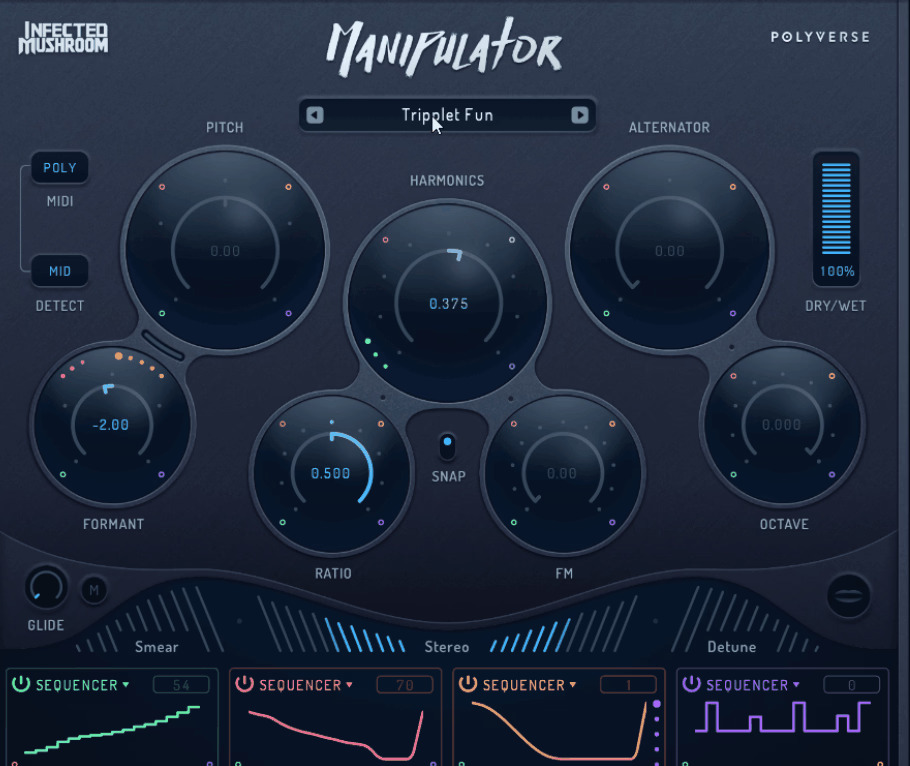
What the engine includes:
- MIDI pitch control
Manipulator responds to live MIDI input, letting you play the pitch of incoming audio in real time from a keyboard or controller. In Poly mode it generates up to 4 simultaneous voices, turning a single monophonic source into harmonized material with the processing character applied per voice.
- Gated mono and poly modes
In addition, plugin mutes when no MIDI note is held, which makes a sustained recording behave like a playable instrument. I find this useful for creating rhythmic vocal stabs and controlled melodic phrases from a continuous vocal take without editing the source material.
- 10 effect modules
Covering pitch shift, formant shift, harmonic shift, grain alternator, smear, stereo, and detune, each module affects the source differently and the combinations between them are where most of the creative depth lives.It’s most useful when running 2 to 3 modules simultaneously rather than stacking everything at once.
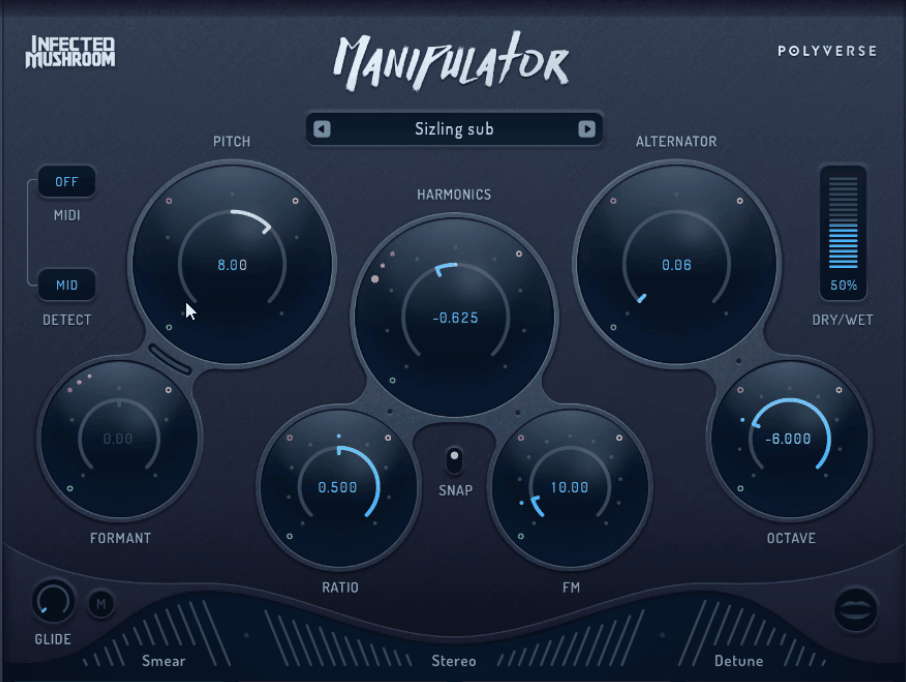
- Formant and harmonic shifting
Independent formant control lets you shift the timbral identity of the source separately from its pitch, preventing the unnatural character that straightforward pitch shifting produces on vocals. The harmonic shift moves the harmonic content independently of the fundamental, producing tonal changes that sit between pitch shifting and filtering.
- Grain Alternator
Cuts the source into grains and shifts individual cycles independently, with grain length covering up to 8 octaves of change. At moderate settings it adds thickness and movement. Push it further and the processing produces subsonic, LFO-like timbral movement suited to drones and experimental vocal textures.
Where it works
Lead vocals are where I would reach for Manipulator, though it’s worth being clear that it works best as a creative transformation tool rather than a transparent pitch correction utility.
The processing character is always present to some degree, and I find it most effective on electronic and experimental music where that character is an asset rather than something to hide. For subtle vocal doubling or clean pitch correction, dedicated tools handle those applications more transparently.
Synth leads and monophonic instruments are a different story. The MIDI pitch control and Poly mode produce genuinely interesting results that go beyond what a conventional harmonizer offers, and playing a synthesized lead through Manipulator with MIDI-triggered pitch and the Grain Alternator active at moderate settings produces a layered, harmonically complex texture that feels more like a designed sound than a processed one.
I find sound design and experimental work is where Manipulator surprises me most. It’s one of the more capable tools I’ve used for producing vocal-derived textures that retain a sense of the source material while transforming it beyond recognition, and the combination of granular processing, formant shifting, and MIDI control gives you enough variables to produce results that a single-function processor simply couldn’t approach.
Where it’s less convincing is on polyphonic material and complex harmonic sources. The processing is designed around monophonic input, and on chords or layered material the granular and pitch processing produces artifacts that work against the source rather than transforming it musically.
Pros and cons
Pros:
- MIDI-triggered real-time pitch control
Playing the pitch of incoming audio from a MIDI controller with up to 4 simultaneous voices in Poly mode is a genuinely unique capability that opens up performance and production possibilities that conventional pitch shifters and harmonizers don’t offer.
I find this the most distinctive feature in Manipulator and the one that most directly justifies it over simpler alternatives.
- 10 effect modules with deep combination potential
Having formant shifting, harmonic shifting, pitch shifting, and granular processing available simultaneously within a single plugin produces timbral transformations that would require multiple processors to approximate externally, and the interaction between those processes is where Manipulator’s specific character comes from.
- Grain Alternator depth
The granular processing at more extreme settings produces timbral movement and textural complexity that conventional pitch and formant processors don’t generate, and for experimental vocal and sound design work that depth is genuinely useful rather than just technically interesting.
Cons:
- Monophonic source requirement
Manipulator is designed around monophonic input, and on polyphonic or complex harmonic sources the processing introduces artifacts that limit its practical usefulness. You need to work within that constraint rather than around it.
- Processing character is always present
The granular and formant processing introduces a distinctive character that’s part of the plugin’s identity but means it’s not the right tool for transparent processing applications. If you need subtle, unobtrusive pitch enhancement, more conventional tools are better suited.
- CPU load
Running Poly mode with multiple modules active is noticeably heavier on CPU than simpler pitch processors
Verdict
Manipulator is worth it if vocal transformation and real-time MIDI pitch control are things you’d use regularly and you work in contexts where the processing character is a creative asset rather than a limitation.
The combination of 10 effect modules, granular processing, formant shifting, and MIDI-triggered harmonization produces results that no other single plugin approaches in the same way, and for electronic, experimental, and sound design work that combination could be valuable.
On the flip side, it’s less worth it if you primarily need transparent pitch processing, work with polyphonic source material, or need a conventional harmonizer for clean interval shifts without obvious processing character. Manipulator has a specific identity and serves it well, but that identity is distinctive enough that knowing whether it fits your workflow before purchasing matters more than with more general-purpose pitch processors.
I’d suggest running it on a vocal take with MIDI pitch control active and loading a few of the factory presets before building your own patches, because that combination shows you the range of what’s possible before you invest time in the more detailed parameter work.

Hey, I’m Viliam, I started Music Circuit to write about plugins and gear, so you always know what’s new and what’s worth trying. You’ll also find guides and tips here to help you get started, whether you’re picking your first plugin or building out a full studio.