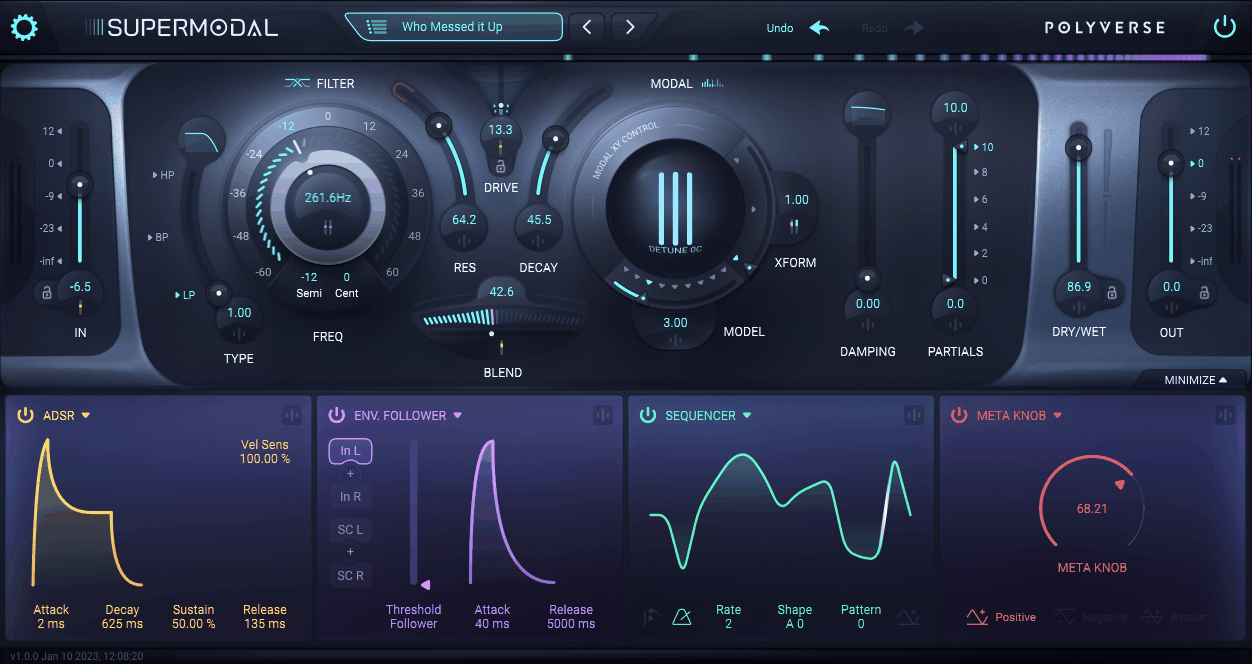
At a first glance, Supermodal looks like a filter plugin, but that undersells it. Polyverse built it around a modal filter that uses 100 tuned band-pass filters per stereo side to model the resonances of physical and abstract objects, so you can use it for filtering, resonation, and much more creative sound design.
That makes it a specialist tool rather than another general-purpose filter. If you want ordinary low-pass filtering, there are simpler options; if you want drums, synths, vocals, or pads to develop a physical, metallic, vocal, or otherwise unusual resonance, this plugin has a much clearer reason to exist.
Also, I’d say it’s a great tool for a psytrance music, I included it in my roundup of the best psytrance plugins, you can check it out here.
The modal filter
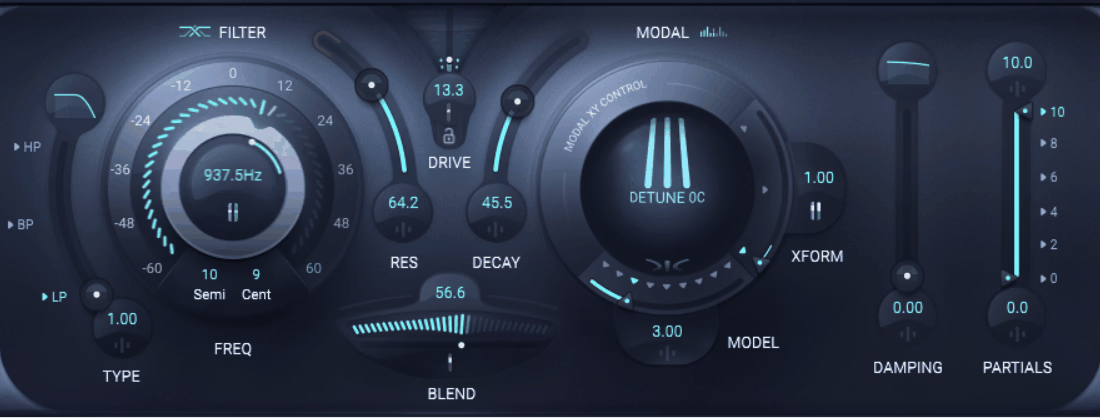
The Modal Filter is the heart of the instrument. Instead of emphasizing one frequency around a conventional resonance peak, it creates a network of related resonances that behaves more like the response of a vibrating object.
That difference is easy to hear on simple material. A saw wave can start to sound metallic or vocal without adding another oscillator, while a drum hit can develop a pitched resonant tail, which is where I find the plugin most useful.
The model selection
The instrument includes 27 models, organized into 9 main families with 3 variations each. They range from physical-style resonators to more abstract and experimental responses, so you are not limited to literal acoustic simulations.
- Physical models:
These are a good starting point for metallic, wooden, glass-like, and other resonant characters. I often use them on percussion and sustained synths because they add harmonics that feel different from normal subtractive filtering.
- Vocal-style models:
These create formant-like resonances that can give synths, noise, and recordings a vowel or talking quality. They are useful when you want movement through different resonant shapes without building a separate vocal-processing chain.
- Abstract models:
Some of the options are less about reproducing a real object and more about creating phasing, flanging, comb-like, or mathematical resonance. Those are the ones I reach for when the goal is unusual texture rather than acoustic realism.
The X/Y sphere ties the system together. Instead of switching between 27 isolated settings, you can move continuously through the model space, which makes automation and live performance much smoother.
The dual filter architecture
The plugin also includes a 24 dB-per-octave state-variable filter, with low-pass, band-pass, and high-pass modes. It runs alongside the Modal Filter, giving you a conventional way to control the overall tone while the modal section handles the resonant character.
I use that second filter frequently because modal processing can add a lot of upper harmonics. The SVF lets me keep the physical character while trimming the frequency range that does not fit the mix, which is much more convenient than treating the output as something I have to clean up afterward.
The SVF also includes Drive, so it can remain fairly clean or add some nonlinear character before the modal processing. That is useful when the source needs a little more density rather than simply another EQ-style adjustment.
Resonance and partial control
Model selection is only half the story. The instrument also gives you Decay, Damping, Resonance, and Partial controls, which determine how long the modeled object rings and how much of its resonant structure remains audible.
A short decay can add a hint of physical character without changing the basic behavior of a sound. Longer settings can turn a drum hit into a sustained pitched tail or make a simple synth behave more like a resonating object.
The Partial control is useful when the full modal spectrum is too dense. You can remove parts of the resonance rather than abandoning the model entirely, which gives you a practical way to fit more unusual sounds into a busy mix.
Pushing resonance beyond 100% can also make the filter self-resonate, so the plugin can move from processing an input toward generating a tone from its own resonant structure.
Modulation and performance
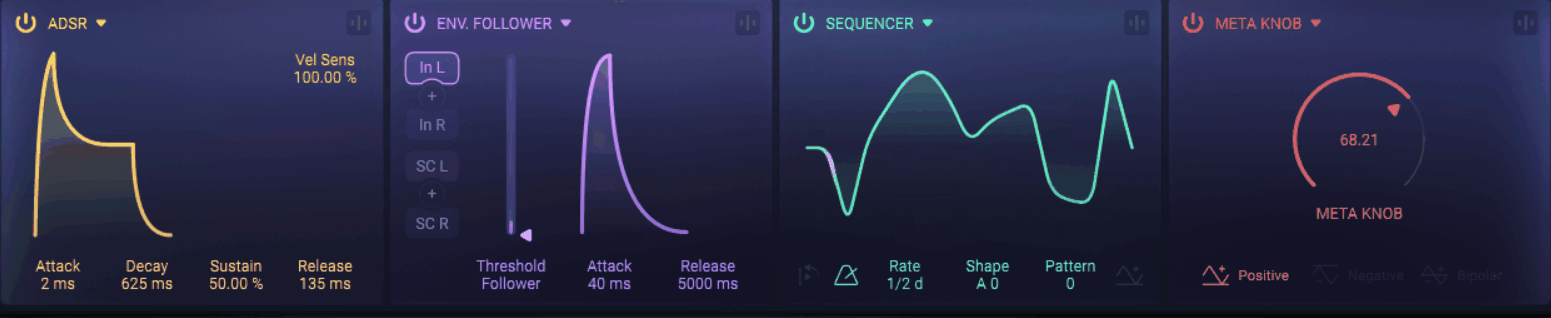
You get 4 modulation slots and 6 modulation sources, including Meta Knob, ADSR, Envelope Follower, Sequencer, MIDI/CV, and Randomizer. That is enough to turn the resonance itself into a moving part of the sound rather than relying on simple cutoff automation.
What you can modulate
- Meta Knob:
The Meta Knob can control multiple parameters at once, which makes it useful for performance and automation. I like assigning modal position, filter cutoff, and decay together so one movement changes the resonance, tonal balance, and sustain at the same time.
- Envelope Follower:
The Envelope Follower responds to the input level, allowing the processing to react to the performance. A louder drum hit can drive more resonance, while a quieter hit produces a softer response, making the movement feel connected to the source.
- Sequencer:
The built-in sequencer can move modal position, filter controls, and other parameters in time with the track. This is where the plugin starts functioning like a rhythmic sound-design tool rather than just a filter.
- ADSR, MIDI/CV, and Randomizer:
ADSR covers familiar note-based modulation, MIDI/CV opens the plugin to external control, and Randomizer introduces controlled variation. I prefer using Randomizer lightly because small amounts can keep an evolving patch from repeating exactly without making it impossible to control.
The modulation slots can also interact with one another, which creates more complex movement without requiring a large automation setup.
Where I find it most useful
On drums and percussion, the modal filter can create pitched resonance from material that may not sound especially tonal in the first place. I particularly like it for turning a dry hit into something closer to tuned percussion or for giving a drum loop a metallic layer without adding another synth.
Synths are another strong application. A simple saw or square wave can pick up inharmonic, vocal, or physical-modeling characteristics, giving you a different palette from ordinary wavetable or subtractive synthesis.
For pads and atmospheric sounds, the X/Y morphing is the feature I would explore first. Slow movement through the modal space can make a sustained sound feel as if its physical composition is changing rather than simply becoming brighter or darker.
Vocals, guitars, strings, and noise also benefit when the source needs a stronger identity. You can impose a new resonant character on an otherwise familiar recording, which is useful for sound design and cinematic layering.
A practical workflow
I would keep the first pass simple. Start with the X/Y model selection and find a resonant character that already suits the source, then use Decay and Damping to control how long the effect remains audible.
After that, bring in the 24 dB state-variable filter to contain the frequency range. This is particularly useful with brighter models, where the modal harmonics can sound great in solo but crowd the upper spectrum once everything else in the mix returns.
Then add modulation. Slow X/Y movement works well for pads and drones, while the sequencer is a better choice when you want the processing to become part of the groove.
For performance, I would spend time with the Meta Knob. Map parameters that belong together, rather than simply putting several unrelated controls under one knob. The result is much easier to play and automate.
Presets
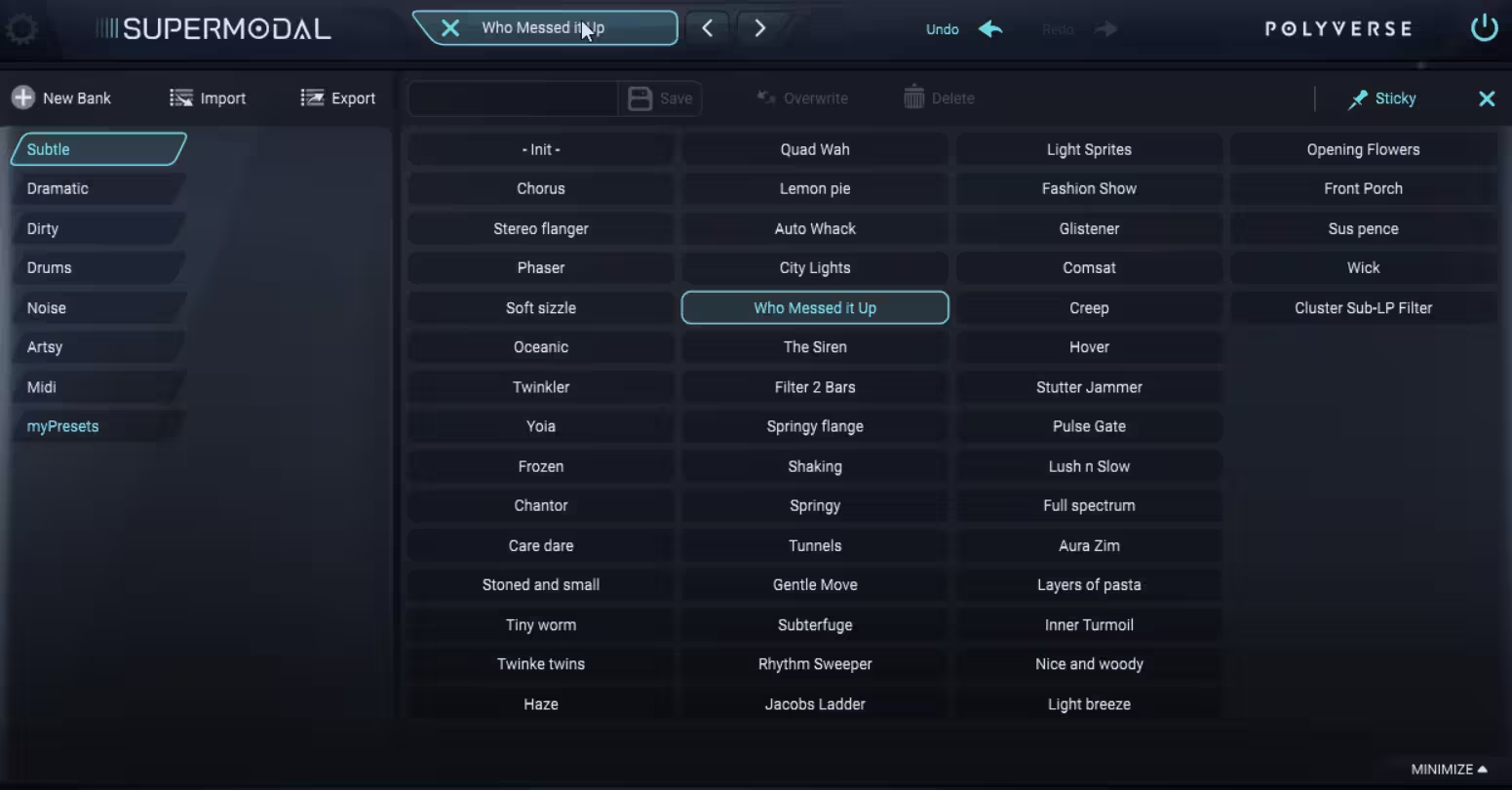
There are 200+ presets, covering a useful range of sounds and source types. The presets are valuable here because the model system can be difficult to understand from controls alone.
I would use them as demonstrations rather than finished sounds. Load one, move the X/Y sphere, pull back the decay, bypass the SVF, and listen to what changes, because that gives you a faster understanding of the architecture than scrolling through preset names.
Where it falls short
This is still a specialist sound-design processor. If your job is simply to remove highs, create a standard low-pass sweep, or make a predictable EQ-style adjustment, a conventional filter will be faster and easier.
The modal character can also be too much. Some models generate a lot of harmonics, particularly in the upper range, and a sound that feels exciting in solo can become difficult to place once the full arrangement returns.
The learning curve is real as well. Between 27 models, two filter sections, resonance controls, X/Y movement, and 6 modulation sources, there is plenty to explore. The first few sessions can easily produce interesting accidents before you develop a clear sense of which models and controls fit which sources.
Pros and cons
Pros
- 27 modal models:
The 9 model families and 3 variations each provide a broad range of physical, vocal, and abstract resonant characters, giving the instrument a sonic identity that conventional filters do not offer.
- 100 band-pass filters per stereo side:
The dense modal structure creates multiple related resonances rather than one conventional resonance peak, which is the main reason ordinary sources can start sounding physically resonant.
- Dual filter architecture:
The combination of the Modal Filter and 24 dB-per-octave state-variable filter gives you both creative resonance and conventional tonal control in one plugin. I find that especially useful for taming the upper harmonics without losing the modal character.
- Strong modulation:
With 4 modulation slots and 6 sources, you can animate the model position, resonance, filtering, and other parameters instead of relying on a static effect.
- 200+ presets:
The preset library gives you useful starting points for drums, synths, pads, guitars, strings, vocals, and other sources, making it easier to hear the instrument’s range before designing from scratch.
Cons
- Specialized rather than universal:
It excels at physical resonance, unusual harmonics, and evolving textures, but it is unnecessary for many straightforward filtering tasks.
- Resonance can build quickly:
Some models produce a lot of harmonic content. The SVF, damping, decay, and partial controls become important when the resonance starts crowding the mix.
- Learning curve:
The combination of 27 models, two filters, and 6 modulation sources gives you plenty of possibilities, but deliberate results take some time to develop.
Verdict
Supermodal makes sense when you want resonance to become part of the sound rather than simply adjust its frequency balance. The 27 models, 100 band-pass filters per stereo side, X/Y morphing, and 24 dB state-variable filter give you a practical way to turn drums, synths, vocals, and pads into something more physical or unusual.
I would not treat it as an everyday filter. Its value shows up when a conventional filter stops being interesting, and you want metallic, vocal, resonant, or evolving character without building a complicated chain of processors.
The 200+ presets help you get started, but the deeper payoff comes from combining the models, resonance controls, and modulation yourself. At around $99, I see it as a worthwhile specialist tool for producers who regularly need that kind of sound, rather than a must-have replacement for a standard filter. Hope that helps! You can also try trial first, there is no rush!

Hey, I’m Viliam, I started Music Circuit to write about plugins and gear, so you always know what’s new and what’s worth trying. You’ll also find guides and tips here to help you get started, whether you’re picking your first plugin or building out a full studio.