Let’s talk about some of the best vocoders availabe to your disposal. First created in the 1930s for telecommunications, they’ve stayed important ever since. Whether it’s Kraftwerk’s robotic vocals, Daft Punk’s harmonies, or Bon Iver’s vocal layers, vocoders keep showing up in electronic and experimental music.
They have a reputation for being difficult, even though their basic idea is fairly simple. Basically, they combine two audio sources: your voice acts as the modulator, while a synth provides the carrier signal. The vocoder then uses the characteristics of your voice to shape the synth, producing the distinctive effect it’s known for.
But how you set up a vocoder can be very different from one plugin to another, and the routing can be confusing if you’re new to it. Some plugins have a built-in synth, so you don’t need to connect extra audio. Others need a sidechain setup, which changes depending on your DAW. The sound can also range from warm, vintage tones to harsh, digital effects.
With that said, I’ve gathered 10 vocoder plugins that showcase what’s out there today, from classic recreations to modern tools that mix vocoder, pitch shifting, and vocal synthesis so you get all sorts of tools to choose from! Let’s get started.
1. Polyverse Manipulator
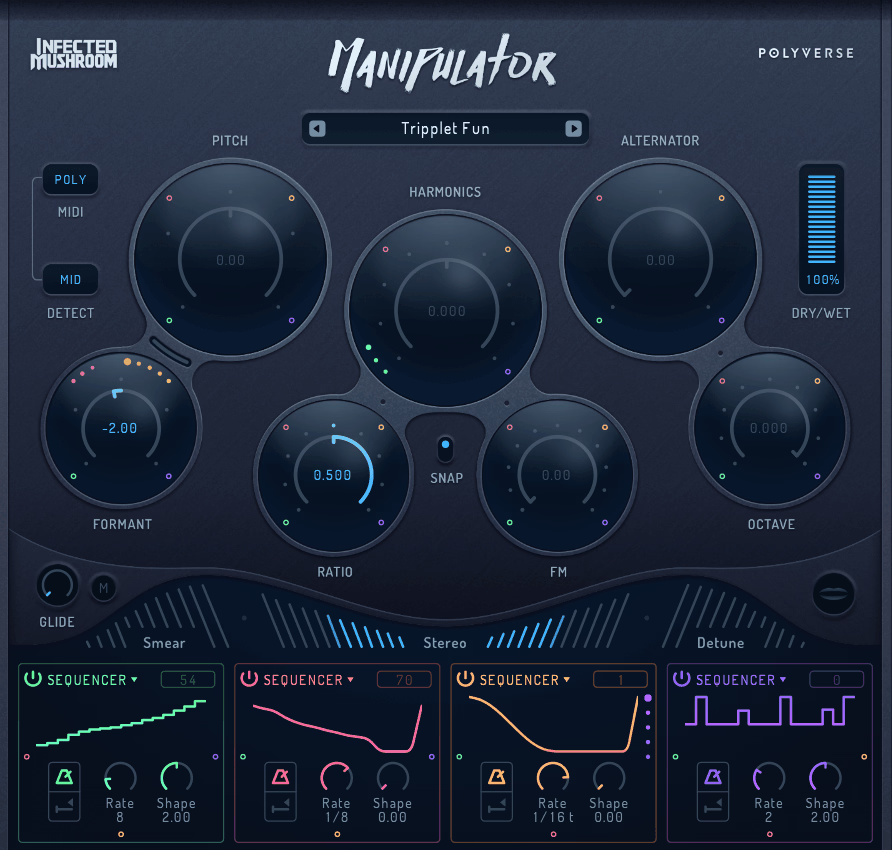
Created with Infected Mushroom, Polyverse Manipulator moves beyond standard vocoding into more experimental territory.
Manipulator uses granular algorithms to alter the timbre and pitch of monophonic audio in real time, with 10 effects, including pitch shifting, formant shifting, harmonic shifting, sound smearing, and a grain alternator that in my opinion makes it a great tool for a sound designers.
I would also mention that it accepts MIDI input for on-the-fly pitch control, supporting up to 4 polyphonic voices.
It also functions as a vocal transformation tool capable of classic vocoder-like sounds, as well as unique vocal effects that conventional vocoders do not offer.
If you only want the classic “talking synth” sound, other plugins here do that better I think. But anyway, if you want to push vocals into new and unusual sounds, I would say Manipulator lets you explore places other tools can’t reach, so consider giving it a shot!
Here is what you’re getting:
- Granular Engine
Unique granular algorithms dramatically alter the timbre and pitch of incoming monophonic audio in ways that conventional pitch shifters and vocoders can’t replicate.
You can add gentle harmonies to a vocal or process it so much that it sounds completely different from the source. In addition, for producers who want vocal effects that sound genuinely new rather than variations of familiar vocoder tones, the granular approach gives you a different sonic vocabulary to work with.
- MIDI Pitch Control
Accepting MIDI data in real time lets you play pitch changes via a keyboard or MIDI controller, effectively turning Manipulator into a performance instrument.
- Lots of effects
This is I think the best part. You get 10 built-in effects, including pitch processing, formant shifting, harmonics shifting, FM, sound smearing, and pseudo stereo, provide a vast range of vocal transformation possibilities from a single plugin.
You can combine these effects in many ways, giving you lots of diff erent sounds to try out and experiment with.
- Infected Mushroom DNA
Polyverse co-developed with Infected Mushroom over several years, with the duo using evolving prototypes during the creation of their album “Return To The Sauce.”
This feedback process meant the plugin changed based on real studio use, not just planned features. If you like tools formed by real creative work, you’ll notice how this plugin feels.
2. Arturia Vocoder V
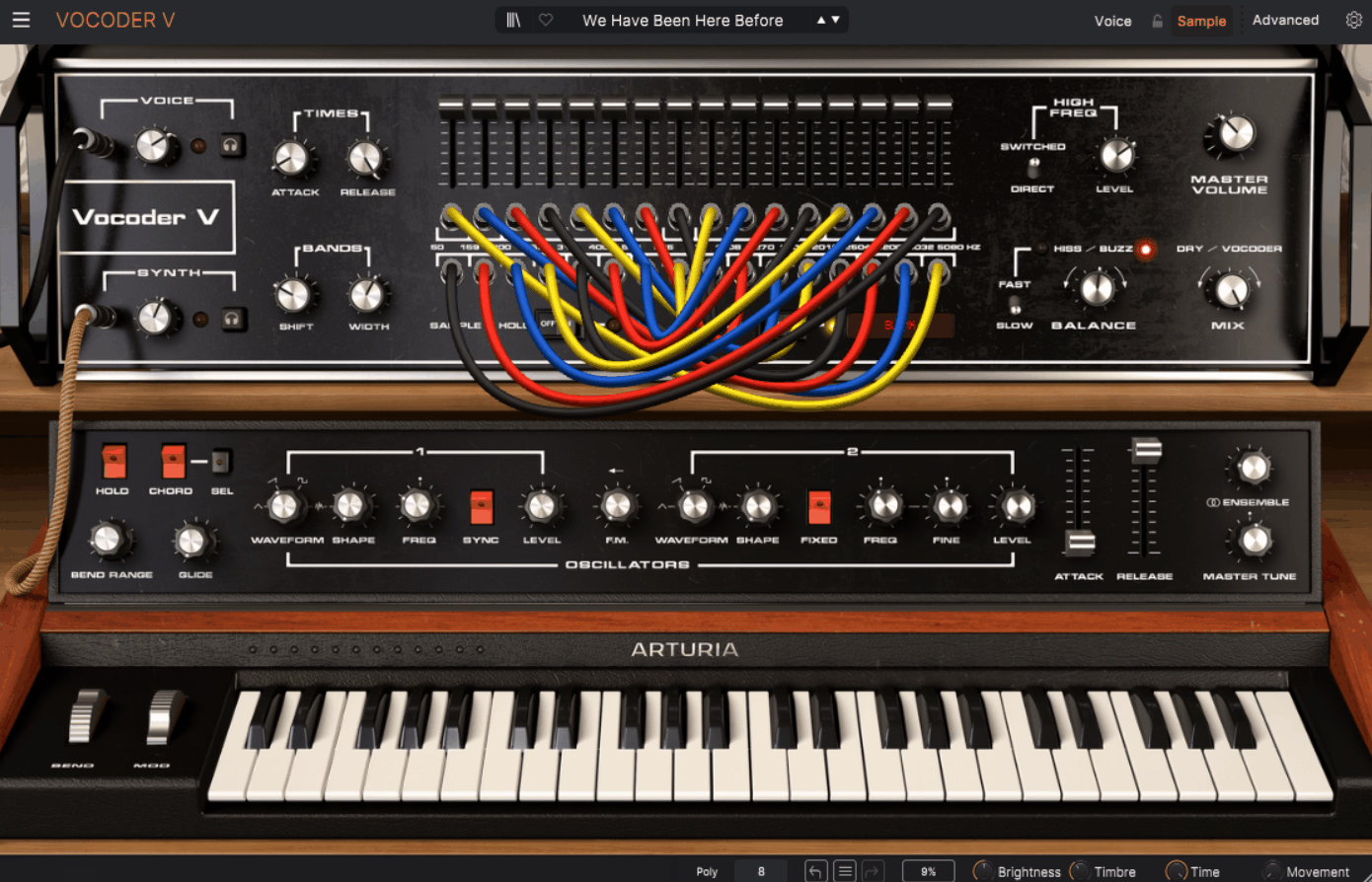
Part of Arturia’s V Collection, this is Arturia’s recreation and expansion of the classic 16-band analog channel vocoder concept, bringing the richness and tone of vintage hardware vocoders into a modern plugin format.
Arturia Vocoder V combines a faithfully modeled analog vocoder engine with Arturia’s signature approach of enhancing vintage designs with modern features that the originals never had.
What I appreciate about Vocoder V is that Arturia designed it with the same philosophy they apply to their other V Collection instruments.
They model the classic hardware closely, then add modern features to make the vintage sound easier to use and more flexible. Vocoder V delivers it with the genuineness that Arturia’s emulation expertise provides.
- Analog Modeling
Arturia’s component-level modeling recreates the behavior of analog vocoder circuitry, producing the warm, slightly colored sound that hardware vocoders generate naturally.
Digital vocoders can sound precise and clean, which is useful in some contexts, but they miss the organic warmth that made hardware vocoders musically appealing.
For producers who want the Kraftwerk and Herbie Hancock vocoder aesthetic rather than a sterile digital effect, the analog modeling captures that character.
- V Collection Quality
Built with the same modeling technology that powers Arturia’s acclaimed V Collection of vintage instrument recreations.
Arturia’s history of accurately recreating classic hardware makes Vocoder V more trustworthy than those of newer or lesser-known companies.
You’re getting vocoder modeling from a company that has spent years perfecting its approach to recreating analog circuits in software.
- Modern Additions
Expanded features beyond the original hardware include additional modulation options, effects processing, and preset management that vintage vocoders didn’t offer.
You get vintage sound with modern features, so you can focus on making music instead of dealing with old hardware limitations.
- Carrier Synth
A built-in synthesizer provides the carrier signal without requiring external routing, simplifying the setup and making vocoders less intimidating for many producers.
3. Waves OVox Vocal Resynthesis
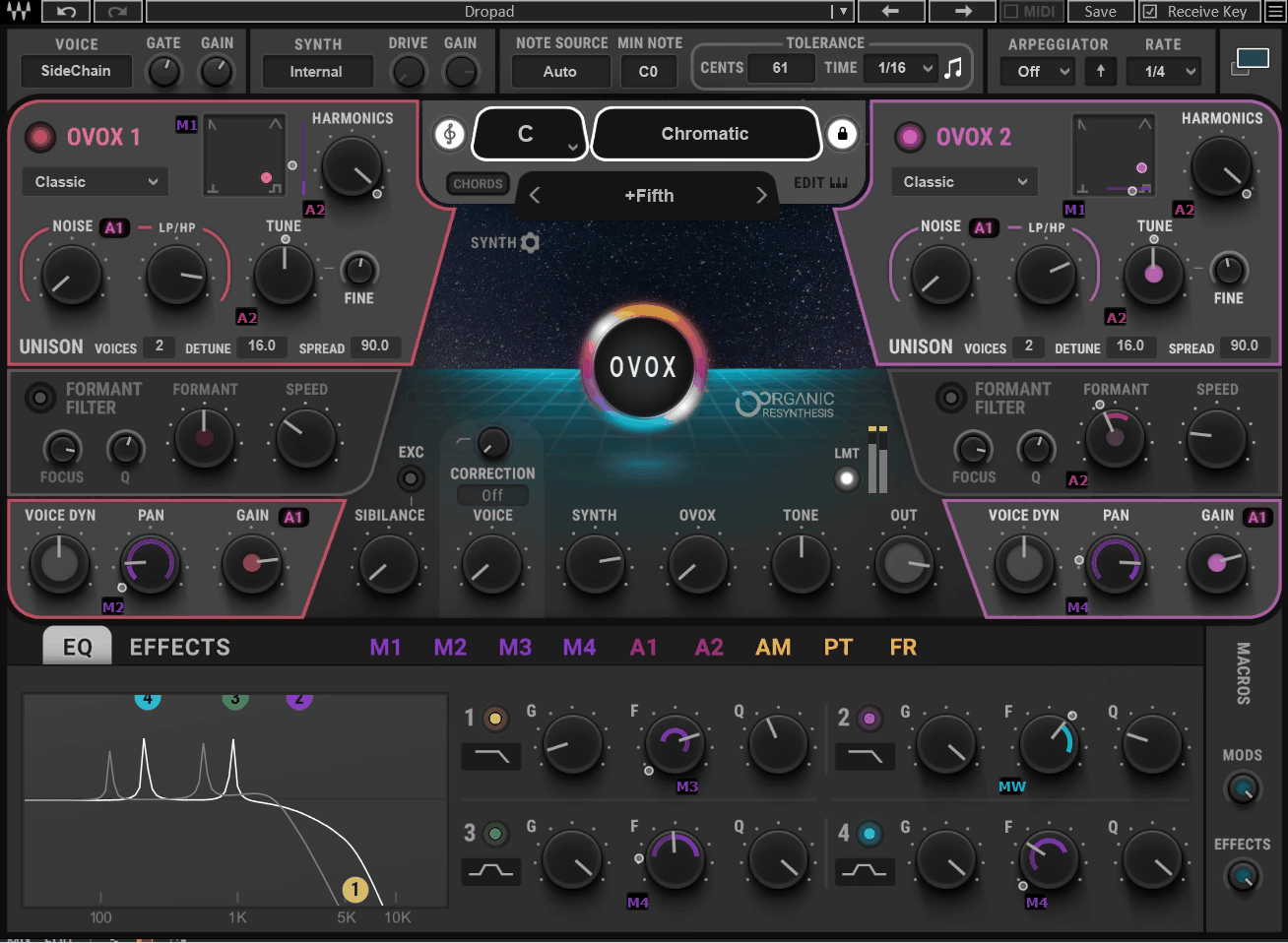
Waves’ dedicated vocal resynthesis engine that combines vocoder, talkbox, and vocal morphing capabilities in a plugin designed to be more immediately usable than traditional vocoders.
I like OVox more than Waves’ older Morphoder because it’s easier to use. OVox automatically detects the pitch of your vocals and uses it for synthesis, so you can get vocoder effects without setting up MIDI.
You can still use MIDI for more control, but the automatic pitch detection lets you get results faster.
- Auto Detection
Automatic pitch detection analyzes the incoming vocal and uses the detected pitch to drive the synthesis engine, meaning you can achieve vocoder effects without MIDI routing.
If you want fast vocal effects without setting up MIDI or sidechains, auto detection gives you usable sounds in seconds.
- Voice-to-MIDI
Built-in voice-to-MIDI conversion translates your vocal performance into MIDI data that controls OVox’s internal synthesis. Sing a melody, and OVox plays it back as a synthesized sound, effectively turning your voice into a MIDI controller.
If you don’t have a MIDI keyboard, you can control the vocoder just by singing into your mic.
- Talkbox Mode
A dedicated talkbox simulation recreates the classic effect of routing a synthesizer through a tube and into the performer’s mouth. Real talkboxes require physical tubes and are uncomfortable to use.
OVox’s talkbox simulation sounds convincing without needing any special gear, making it practical for both studio and live use.
4. iZotope VocalSynth 2
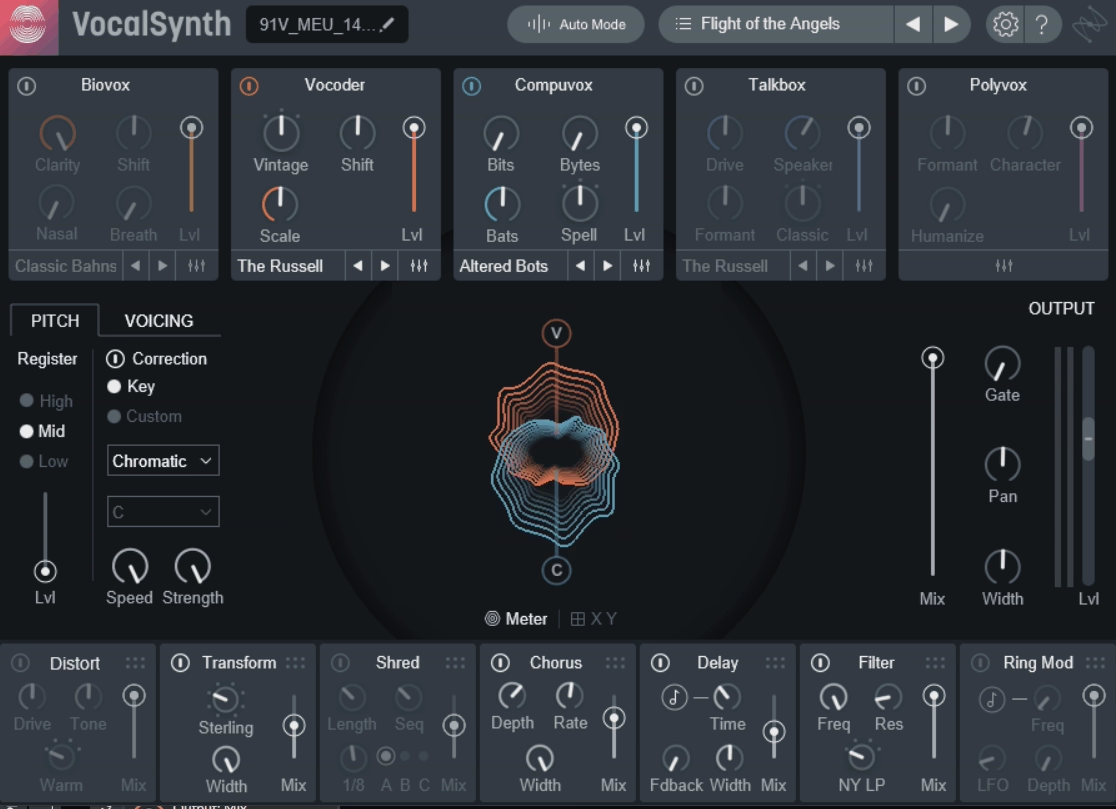
More than just a vocoder, this is a multi-engine vocal processor that combines five different vocal synthesis modules in a single plugin.
I find VocalSynth 2 useful because it offers five different ways to process vocals in a single plugin. You can mix vocoder, talkbox, and harmony effects all together.
You get a Vocoder, Compuvox (a speech synthesis engine), Polyvox (a harmony generator), Talkbox simulation, and Biovox (a vocal tract modeling engine), alongside built-in effects and inter-plugin communication with other iZotope products.
Most other plugins here focus just on vocoding. VocalSynth 2 includes vocoding as one of five features, so it’s great if you want an all-in-one vocal effects tool instead of just a vocoder.
- Five Engines
Five distinct vocal synthesis modules (Vocoder, Compuvox, Polyvox, Talkbox, and Biovox) can be used individually or blended together, creating hybrid vocal textures that no single-engine plugin can produce.
You can mix the vocoder with the talkbox, or layer Biovox’s vocal modeling over Compuvox’s speech synthesis to create sounds you won’t find in other plugins.
- Biovox Module
The Biovox engine models the human vocal tract, letting you reshape vowel sounds and manipulate the physical characteristics of the voice.
Instead of just shaping the sound as a regular vocoder, Biovox simulates how the mouth, throat, and nose affect your voice. This lets you create more natural and unique vocal effects, not just the usual robot voice.
Inter-plugin communication with other iZotope products means VocalSynth 2 can share data and processing context with tools like Nectar, Neutron, and Ozone.
I’d say if you already use iZotope plugins, this integration lets VocalSynth 2 work together with them in ways that standalone vocoders can’t.
- Effects Chain
A built-in effects section with distortion, filter, delay, chorus, and ring modulation lets you process and sculpt the vocoded output within the plugin. Each effect module sits after the vocal engines, meaning you shape the final sound without leaving VocalSynth 2.
If you want fast vocal processing with a finished sound from just one plugin, the built-in effects chain is very handy.
5. OxyDSP OxyMeteor
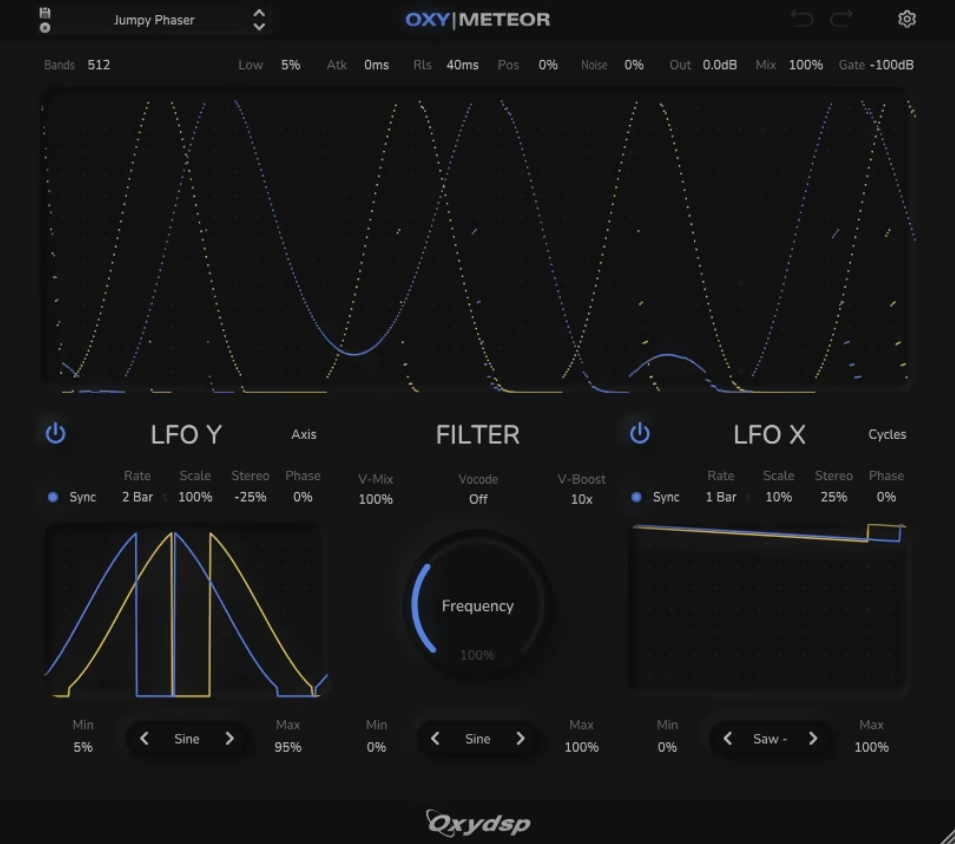
A newer entry in the vocoder plugin space that takes a different approach by combining vocoder processing with spectral resynthesis and formant-based sound design. OxyDSP OxyMeteor is built for producers who want vocoder-adjacent effects alongside spectral processing tools that go past traditional vocoder architecture.
If regular vocoders sound too predictable to you, OxyMeteor’s spectral processing gives you sounds that mix vocoding, spectral effects, and granular synthesis. It’s more experimental and takes some getting used to, but the results can be more creative.
- Spectral Processing
Spectral resynthesis capabilities analyze and resynthesize audio using frequency-domain processing, producing effects that combine vocoding with spectral manipulation.
You get results that sound different from conventional band-pass vocoding because the processing operates on the spectral content of the audio rather than through fixed filter banks.
- Formant Control
Formant-based sound design tools let you reshape the vowel characteristics of processed audio, creating vocal textures that shift between human and synthetic qualities.
If you want to make creature voices, alien speech, or strange vocal effects, the formant controls give you options that regular vocoders don’t have.
- Creative Focus
Designed with experimental sound design as a primary use case rather than recreating classic vocoder sounds. If you need the Kraftwerk robot voice, other plugins on this list do that more directly.
OxyMeteor is great for creating vocal effects that sound completely new, so it’s perfect if you want to avoid the usual sounds.
6. Zynaptiq ORANGE VOCODER IV
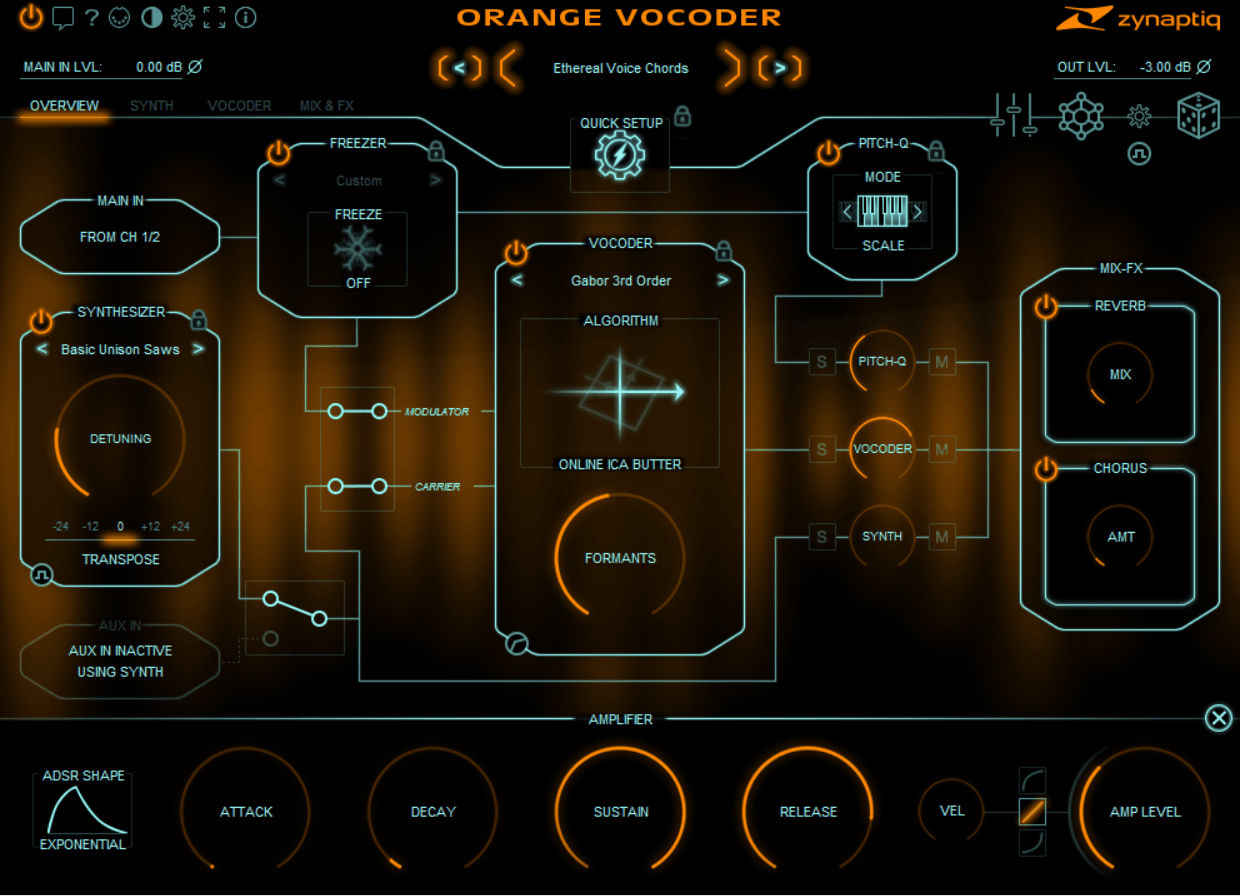
Zynaptiq ORANGE VOCODER IV delivers 24 unique vocoding algorithms, including analog modeling, speech modeling, independent component analysis, LPC filtering, and wavelet transforms.
Carrying a legacy that stretches back to the year 2000, when it was originally released by Prosoniq, this is the most comprehensively featured vocoder plugin I’ve encountered.
It includes a 64-voice synthesizer with a preset generator, a MIDI-controlled pitch quantizer with 5 modes, a Freezer module for sustaining timbres indefinitely, formant shifting, and built-in chorus and reverb effects.
No other vocoder here has as many features. With pitch quantizing, freezing, and formant shifting, it goes far past standard vocoders. But with all these options, it takes time to learn.
- Pitch Quantizer
A MIDI-controlled pitch quantizer with 5 modes (Quantize, Scale, Note, Enforce, and Polyforce) forces incoming audio onto specific pitches, providing automatic tuning and harmonization effects alongside or instead of the vocoder.
Enforce and Polyforce modes use a special approach with zero latency, making them good for live shows. You can use the pitch quantizer to make harmonies, fix tuning, or turn speech into new melodies.
- Freezer Module
A Freezer that sustains the current audio timbre indefinitely captures and holds whatever sound is currently passing through the plugin. You can freeze a vowel sound, a chord, or any audio moment and play melodies over it via MIDI.
The Freezer comes before the pitch quantizer, so you can capture a sound and then play it musically. For ambient producers and sound designers, the Freezer is an outstanding feature.
- Formant Shifting
Dedicated formant-shifting, independent of the vocoder processing, lets you alter the perceived vocal character of the modulator signal. Shifting formants up makes a voice sound smaller or younger, while shifting down makes it sound larger or deeper.
If you’re designing character voices or sci-fi effects, formant shifting gives you creative options that most vocoders don’t have.
- Smart Randomizer
A smart randomizer creates new sounds by changing settings in musical ways. When you need inspiration, it gives you results that are more useful than just random changes.
7. Waves Morphoder
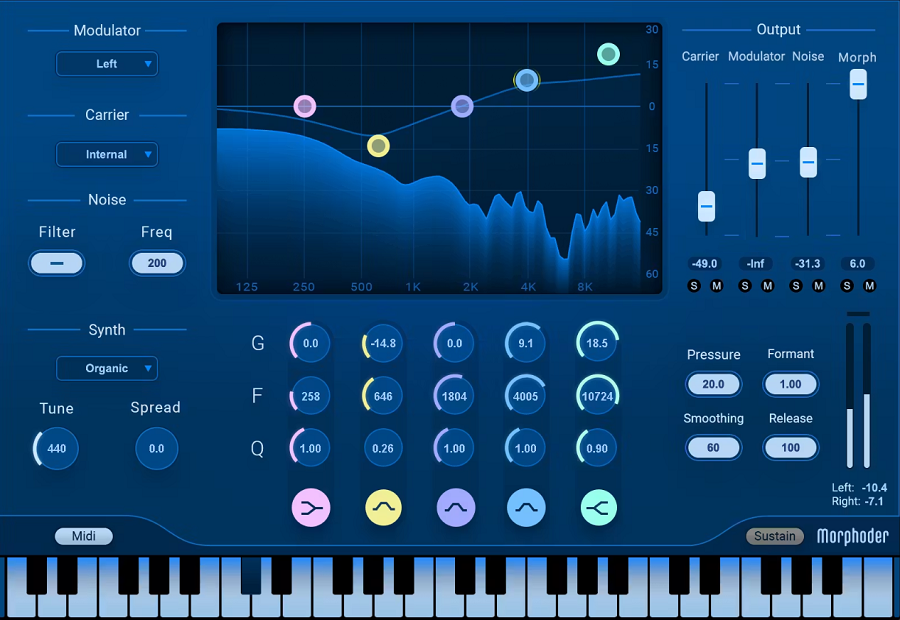
Waves Morphoder combines a vocoder engine with a built-in synthesizer, a noise generator, and an integrated effects section into a plugin that delivers traditional vocoding with the reliability and polish that Waves products are known for.
Morphoder isn’t the newest or most feature-packed, but it delivers a classic vocoder sound and is easy to use. If you already use Waves plugins, it fits right into your setup.
Sometimes, a plugin that just works well and is easy to use is better than one with lots of features that takes a long time to learn.
- Built-In Synth
A polyphonic synthesizer with 5 oscillators provides the carrier signal internally, eliminating the need for external sidechain routing.
Just load Morphoder on your vocal track, play your MIDI keyboard, and it works right away. If you want vocoder effects without a complicated setup, its all-in-one design makes things easy.
- Noise Generator
An integrated noise generator adds unvoiced consonant sounds (like S, T, and F) back into the vocoded signal, which improves the intelligibility of vocoded speech.
Without noise synthesis, vocoded vocals can lose clarity and sound muddy. Morphoder fixes this by detecting unvoiced sounds and adding the right noise to keep speech clear.
- Effects Section
Built-in effects, including EQ, compressor, and delay, let you process the vocoded signal within the plugin rather than adding separate effect plugins after it.
If you want a quick vocoder setup that sounds polished and ready to mix, the built-in effects take care of the basics without needing extra plugins.
8. MeldaProduction MVocoder
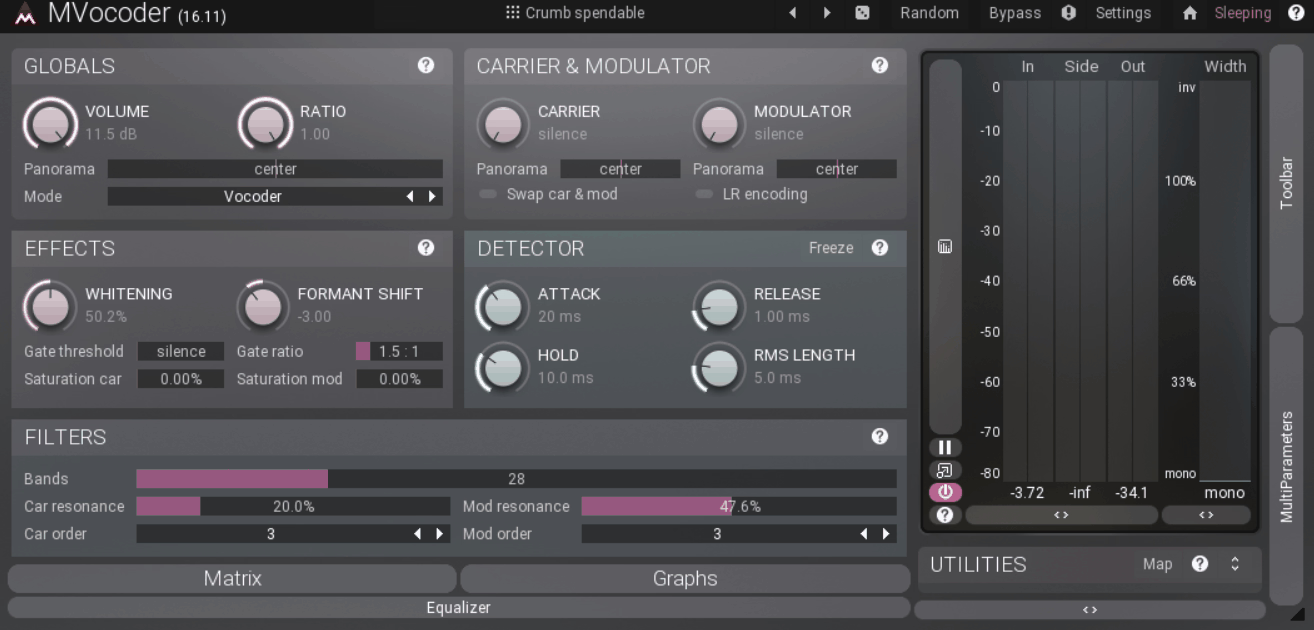
This one provides a vocoder engine with extensive parameter control, multiband processing, and Melda’s trademark ability to customize virtually every aspect of the processing chain.
You can adjust each band, change how the analysis works, and tweak the filters with MVocoder. But if you just want to use a preset, that’s easy too.
- Deep Customization
Melda’s approach of providing extensive parameter access means you can adjust individual vocoder bands, modify analysis behavior, and customize filter characteristics to a degree that simplified vocoders don’t allow.
I would like to mention that for sound designers who want precise control over how the vocoder analyzes and resynthesizes audio, the parameter depth lets you fine-tune the processing to match your exact creative intention.
- Multiband Engine
Multiband processing provides frequency-specific vocoding control, letting you apply different processing characteristics to different frequency ranges of the audio.
You can vocode just the midrange and leave the bass and treble alone, or use different vocoder settings for different frequencies. This multiband approach gives you more creative control than standard vocoders.
9. Softube Vocoder
Who doesn’t know Softube? They are known for their high-quality analog modeling, brings that same care to their vocoder plugin. Softube Vocoder has a simple, focused design with the rich warmth they’re known for, making it easy for beginners to use.
If you want a vocoder that sounds warm and musical and is easy to learn, this one is a no brainer.
Softube’s analog modeling expertise produces a vocoder sound with the warmth and character that their amplifier and console emulations are known for.
The Vocoder sound is warm and slightly saturated, fitting nicely into mixes without being abrasive. If you want musical, not mechanical, vocoder effects, the analog modeling really helps.
- Simple Interface
The interface is simple and focused, showing only the main controls. You can change settings and hear changes right away, without digging through menus.
If you’re new to vocoders, the simple design means you can start making sounds in minutes instead of spending time learning the interface.
- Mix Integration
Softube designs their plugins to sit well in a mix context rather than sounding impressive in isolation but fighting with other elements when added to a full arrangement.
The Vocoder’s sound fits well in a mix, so your vocoded vocals blend with other tracks instead of clashing or standing out too much.
10. XILS 201 Vocoder
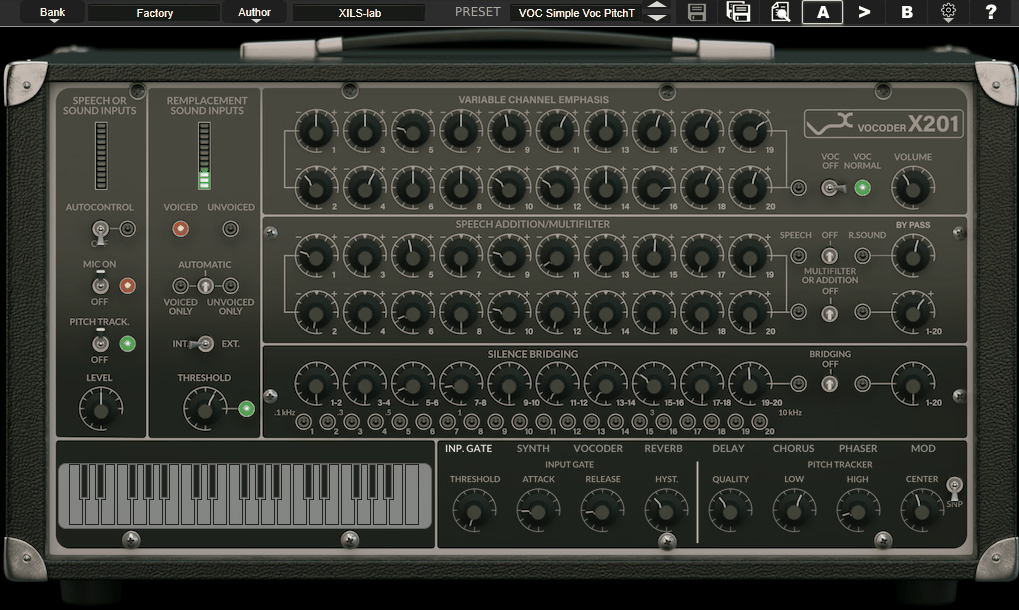
This is my favorite one. It’s a dedicated recreation of the classic EMS Vocoder 2000 and its predecessor, the iconic hardware vocoder that helped define the sound of electronic music in the 1970s.
XILS 201 Vocoder is built by XILS-Lab, the French developer known for their detailed recreations of vintage analog synthesizers and processors.
It basically combines faithful hardware modeling of the authentic EMS vocoder architecture with a patch matrix system that lets you route and manipulate the individual vocoder bands.
I like XILS 201 because it focuses on recreating one classic piece of hardware, instead of trying to do everything at once.
If you want the warm, natural, and slightly unpredictable sound of real vintage hardware, XILS 201 comes closer than most digital vocoders. It may not be the most versatile, but it has a lot of character.
- EMS Heritage
Modeling based on the EMS Vocoder architecture reproduces the specific filter bank behavior, band interaction, and sonic character of the original hardware units, which defined the classic vocoder sound in the 1970s.
If you’re after the vintage vocoder sound from old records, XILS 201 feels more authentic than modern vocoders that aren’t based on real hardware.
- Patch Matrix
A routing matrix lets you connect individual analysis bands to different synthesis bands, creating cross-patched vocoder configurations that standard vocoders don’t allow.
You can connect low-frequency bands to high-frequency ones, or the other way around, to make unusual vocoder effects. If you like to experiment, the patch matrix is where you can be creative.
- Analog Character
XILS-Lab’s component-level modeling reproduces the warmthiness, saturation, and slight variability of analog vocoder circuitry. Digital vocoders produce clean, precise results.
Analog-modeled vocoders sound warmer and more lively because they copy the natural behavior of real hardware circuits.
If you notice the difference between software and analog synths, you’ll hear the same kind of difference with vocoders.
- Vintage Credibility
XILS-Lab has built its reputation on faithful recreations of vintage analog synthesizers, including the EMS VCS3, PolyM, and other classic instruments. Their experience modeling vintage analog circuits gives the 201 Vocoder a credibility that general-purpose plugin developers can’t match.
Lastly, you care about real vintage sound, XILS-Lab’s experience shows they know and respect the authentic hardware they’re modeling.

Hey, I started Music Circuit to write about plugins and gear, so you always know what’s new and what’s worth trying. You’ll also find guides and tips here to help you get started, whether you’re picking your first plugin or building out a full studio.