When you purchase through the links on my site, you support the site at no extra cost to you. Here is how it works.
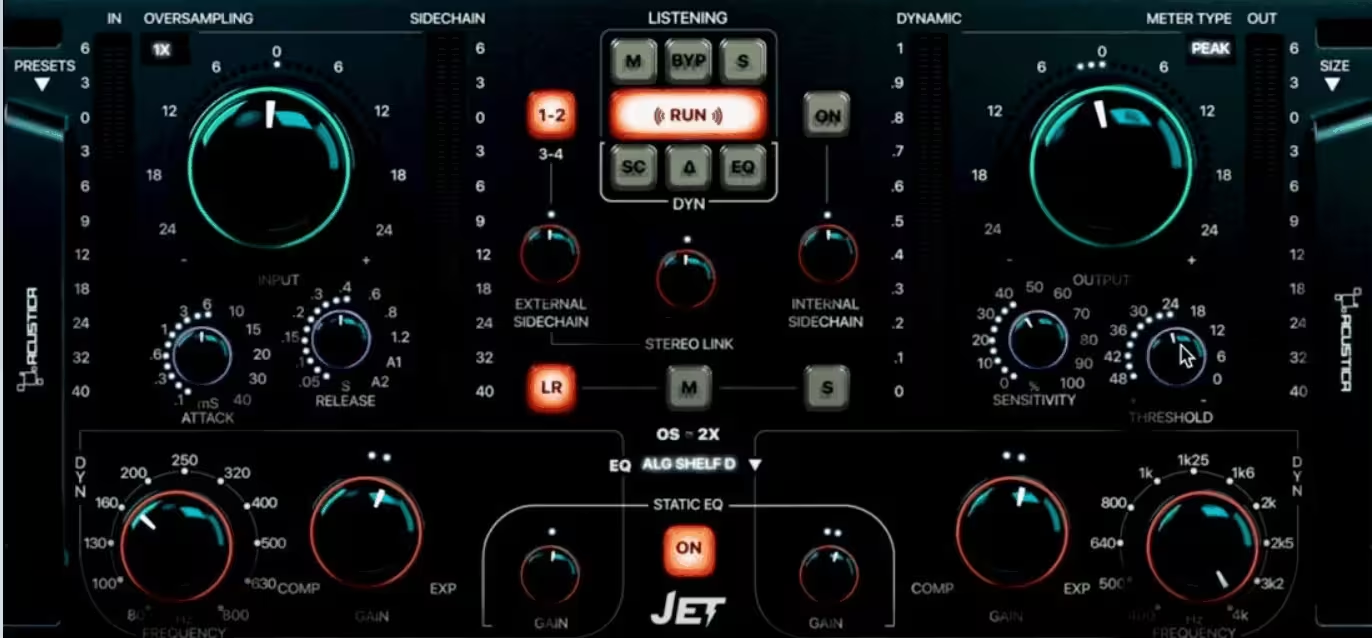
Free audio plugins can be a mixed bag, but Acustica Audio JET is one of those free tools that has an obvious place in a real mixing setup. It is a two-band dynamic EQ with static EQ, three included EQ models, stereo, mid and side operation, plus internal and external sidechain options, so you can control frequencies that become excessive only when the signal gets louder or denser.
Acustica offers two free versions, JET for bus processing and JET MIX for general mixing, with VST, VST3, AU and AAX support. The free version includes three EQ models for the dynamic section, including one sampled model derived from Acustica’s Eminence plugin and two algorithmic options called Digital Shelf and Digital Shelf HQ 2X, with focused frequency ranges that make JET better suited to broad tonal shaping than surgical correction.
What JET does and where it fits
The easiest way to think about JET is as an EQ that responds to the performance instead of applying the same correction all the time. A vocal might become harsh on louder phrases, a bass part might have a few notes that jump out, or a mix bus might get aggressive when the arrangement becomes dense, and instead of cutting those frequencies across the whole track, JET can make the correction only when the problem appears.
Its two-band design is useful when you already know the one or two areas that need attention, while threshold, timing and sensitivity controls let you shape how the dynamic processing responds. The bands can work with compression or expansion, and the Classic Stereo, Mid and Side modes make it practical for both individual sources and stereo buses.
The external sidechain is especially useful when one source needs to make room for another, such as using the kick to trigger a low-end reduction on the bass. Mid/side processing gives you another way to keep the correction targeted when a problem is more noticeable in the center or the stereo information.
Practical uses and setup
JET is most useful when a frequency is only a problem sometimes, because a permanent EQ cut can easily make the rest of the performance thinner or duller. Vocal harshness, bass notes that jump out, aggressive cymbals and occasional buildup on instrument buses are all good examples where dynamic control makes more sense than a static cut.
I’d use it for:
- Taming harsh vocals
If a singer only gets sharp on louder words, JET can pull back the upper mids when they become aggressive while leaving the rest of the vocal alone.
- Controlling bass peaks
Some bass notes naturally jump out more than others, so dynamic control can catch those moments without making the whole bass part thinner. The external sidechain can also let the kick trigger a small reduction on the bass.
- Smoothing drum buses
Cymbals and upper mids can become aggressive when the drummer hits harder, even if the kit sounds balanced elsewhere. A little dynamic control can keep those louder sections under control without dulling the entire kit.
- Cleaning up guitars
Layered or distorted guitars can build up in the mids when several parts play together. JET can reduce that buildup when it appears while leaving the guitars full and present through the rest of the song.
- Balancing the mix bus
A mix can sound balanced for most of a track but become slightly too bright, boomy or crowded in a chorus. A gentle dynamic band can deal with those moments without forcing a permanent EQ cut across the whole mix.
- Targeting the stereo image
When a problem sits mainly in the center or on the sides, Mid or Side mode lets you work on that specific part of the signal. This is useful when a normal stereo EQ move would affect more of the mix than you want.
- Adding tonal movement
JET can also be pushed beyond corrective work, using dynamic EQ to make synths, loops or other sounds change tone as their level changes. That can turn the frequency movement itself into part of the sound.
The easiest way to set up JET is to start by identifying the problem you want to control, then choose the frequency range and adjust the dynamic band until it reacts only when that problem appears. Keep the amount of reduction fairly light at first, then use the threshold, attack and release controls to make the movement follow the source naturally rather than sounding like an obvious effect.
For bass, drums and other sources where several sounds are competing for space, the external sidechain can make the processing more targeted, such as having the kick trigger a small reduction in the bass. Once you have the problem under control, bypass JET and compare the two versions so you can make sure you’re actually improving the balance rather than simply changing the character of the source.
What you get for free, and the limitations
JET and JET MIX are both free, and the core versions include three EQ models, static and dynamic EQ, stereo/mid/side modes, internal and external sidechain support, and VST, VST3, AU and AAX formats. Acustica Audio JET
Acustica also sells optional Jet Volumes with additional EQ models, but you do not need them to use the free plugin effectively. Volume A adds 24 additional EQ emulations, while Volume C adds four more models. Jet Volume A and Jet Volume C
The main limitation is the two-band design, so JET is best when you have one or two specific problems rather than several unrelated frequency issues. The interface is also more control-focused than display-focused, with less real-time spectral feedback than some modern EQ workflows, while Acustica’s processing can be relatively demanding on CPU.
Installation is another small consideration because JET uses Acustica’s Aquarius Desktop application, so it is not quite as immediate as a simple standalone installer. None of these limitations are deal-breakers, but they are worth knowing before you build JET into a larger session.
How I would actually use it
I’d treat JET as a problem-solving plugin rather than an EQ that needs to stay on every track. Put it where something occasionally gets out of hand, find the frequency involved, use a conservative amount of movement, and keep the processing inactive when the source already sounds right.
On vocals, that might mean controlling harsh upper mids; on bass, catching a few dominant notes; on drums, taming aggressive cymbals; and on buses, managing tonal shifts that only appear in louder sections. The goal is for the correction to be noticeable because the source sounds better, not because you can hear the processor working.
Bottom line
Acustica Audio JET is worth installing because it solves a specific mixing problem well: controlling a frequency only when that frequency becomes a problem. The free version gives you enough dynamic EQ, static EQ, EQ models, sidechain control and mid/side processing to make it useful on real mixes rather than simply another plugin to try once.
I wouldn’t treat it as your only EQ, but that isn’t necessary. Keep it around for vocals that get harsh, bass notes that jump out, aggressive drums, or buses that occasionally need tonal control, and it can save you from making permanent cuts where you don’t actually need them.

Hey, I’m Viliam, I started Music Circuit to write about plugins and gear, so you always know what’s new and what’s worth trying. You’ll also find guides and tips here to help you get started, whether you’re picking your first plugin or building out a full studio.